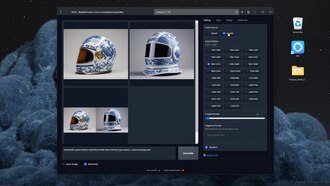
Fast easy free generative AI tool (Stable Diffusion - Fooocus)
Miro Leon
Make a clip
CC BY 3.0 · Miro Leon
Up to 60 seconds, at most the picture size of the copy it is cut from. The clip carries the title, the credit, the licence and a link back here. It is made in this browser, and nothing is sent to this site.
Or send the moment itself: https://invisiblenetwork.ai/watch/archive/commons/153909769?play=1&t=0
Parts
About
JOIN OUR DISCORD! https://discord.gg/9JtYAqdWzq In this tutorial, I give you an introduction to Stable Diffusion using the WebUI Fooocus – perhaps the fastest, easiest and free way to get started with generative AI to date. We will create a space helmet made from Chinese porcelain as an example. If you have any questions or want to see more tutorials for generative AI, let me know in the comments!
wallpaper miroleon dot gumroad.com/l/wallpaper_inflate_land
Fooocus on GitHub – https://github.com/lllyasviel/Fooocus#download 7zip Download – https://www.7-zip.org/ Guidance Scale Explanation – https://getimg.ai/guides/interactive-guide-to-stable-diffusion-guidance-scale-parameter
Find my other artwork on Instagram – https://www.instagram.com/miroxleon/ Follow me on Twitter – https://twitter.com/miroxleon For all other links and contact, visit my website – https://miroleon.de/links
0:00 Introduction 0:16 Download Fooocus 0:30 Download 7zip 0:51 Unpacking Fooocus with 7zip 1:00 Starting Fooocus 1:40 Opening the WebUI 2:08 First Prompt 2:21 System Requirements 3:00 Checking GPU and VRAM 3:30 Prompt Improving by Weighting 4:25 Fooocus Advanced Settings 4:35 Set Resolution and Ratio 4:44 Quality vs Speed Mode 5:30 Negative Prompt 5:45 Seed 6:24 Styles in Fooocus 7:08 Fooocus Model, LoRA, and Refiner 7:26 Guidance Scale 7:56 Fooocus Output Folder 8:22 Fooocus Log File 8:43 Fooocus Image Input 8:49 Creating Variations 9:08 Image Prompts 9:12 Fooocus Inpainting 9:44 Fooocus Outpainting 9:58 Image Upscaling 10:25 Outro
GenerativeAI #GenerativeAIart #StableDiffusion #Fooocus #GitHub #Free #FreeDownload #Tutorial #Beginners #BeginnersGuide #BeginnerFriendly
AI-generated Its own record says a model made it. What this means.
More from Wikimedia Commons
 Short
Making a silver chain
 Short
Jennifer Doudna Nobel Prize medal presentation
 Short
¿Qué es Wikipedia?
 Short
Wie entstehen Fossilien (CC by 4.0)
 Short
Rudy Mancuso & Maia Mitchell - Magic (Official Music Video)
 Documentary
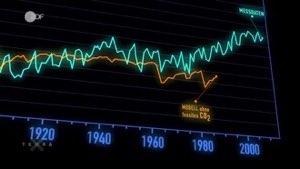
Die wichtigsten Klimafaktoren (ZDF, Terra X) 720p 50FPS
 Short
Curiosity's Seven Minutes of Terror
 Short
Wikilovesmonuments.org
 Short
Wikipedia - FactsMatter2016
 Short
President Obama on Death of Osama bin Laden no watermark
 Short
Cassini's Grand Finale
 Cartoon