Opening the book…
Now that we’ve seen how to combine channels with Channel Operations, let’s see how to combine bins using Bin Operations. One of the most common reasons to combine bins is to make a difference wave, in which we subtract one bin from another. In an N400 experiment, for example, we can isolate the brain activity that differs between related and unrelated target words by constructing an unrelated-minus-related difference wave.
Our ERPsets currently have 4 bins, with Bin 3 being related targets and Bin 4 being unrelated targets. To create an unrelated-minus-related difference wave as Bin 5, we use the following equation:
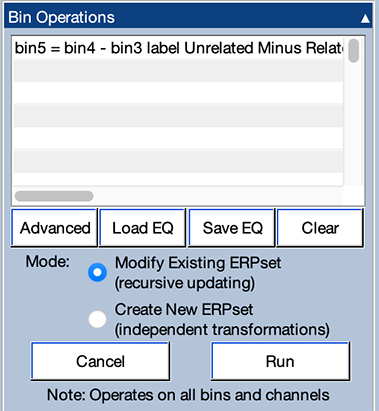
bin5 = bin4 - bin3 label Unrelated Minus Related Target
To get started, clear the grand average ERPset from the previous exercise (using the Clear button in the ERPsets panel) and select the 10 single-participant ERPsets.
Now open the Bin Operations panel. Just as with Channel Operations, you will see a set of lines for writing equations at the top of the panel. Type (or copy and paste) the equation into the top line of the panel and make sure that everything else is set up as shown in Screenshot 3.17. Then click Run to perform the operation on the selected ERPsets.
If you look in the Bin & Channel Selection panel, you'll see that you now have a Bin 5. If you select Bins 3, 4, and 5 (and click Apply), you'll be able to see how the difference wave (Bin 5) is related to the two "parent" waves (Bins 3 and 4).
Now let's make a grand average of the updated ERPsets by going to the Average Across ERPsets (Grand Average) panel and clicking Run. You should now see something like the plot shown in Screenshot 3.18.
You can see that the voltage in Bin 5 at a given time point is the difference between the voltages for Bins 3 and 4 at that time point. Note that the difference wave subtracts away any brain activity that is identical for the related and unrelated targets, such as the negativity at ~100 ms and the positivity at ~180 ms. All that remains is the brain activity that differentiates between the related and unrelated targets. This is an excellent way of isolating the brain activity of interest from the ERP waveforms. If you read my general book on ERPs (Luck, 2014), you’ll see that I’m a big fan of using difference waves to isolate specific brain responses.

Lost Information as a Result of Bin and Channel Operations
The original EEG data files that we used when we began processing this experiment contained information about the 3-dimensional locations of the individual electrode sites. When you use Channel Operations to create a new channel, ERPLAB has no way of knowing the 3-dimensional location that should be used for this channel. And if you modify a channel, ERPLAB isn’t smart enough to know whether the original channel location is still valid. To avoid making assumptions that might turn out to be incorrect, ERPLAB discards the channel information for any new or changed channels when you perform Channel Operations. (If you check the Try to preserve location information box in the GUI, ERPLAB will make a guess about the locations for changed locations, which usually works pretty well.)
The data quality information (including the SEM at each time point) is also lost when you perform Channel Operations. ERPLAB is not smart enough to know how the data quality should be updated for new or modified channels. Similarly, ERPLAB isn’t smart enough to estimate the data quality when you perform Bin Operations. You can get the data quality information by applying Channel Operations on the EEG, prior to averaging. However, you can't perform Bin Operations on single-trial EEG data, so this doesn't help you get data quality information for difference waves. Instead, you need to use a method called bootstrapping to estimate the data quality for a difference wave (see Luck et al., 2021).
The bottom line is that if information about channel locations or data quality is missing, it is likely a result of Bin Operations or Channel Operations.
This page titled 3.11: Exercise- ERP Bin Operations was last modified on Thu, 01 Oct 2026 18:52:36 GMT and is shared under a CC BY-NC 4.0 license and was authored, remixed, and/or curated by Steven J Luck directly on the LibreTexts platform.
The book could not be loaded just now.