Opening the book…
A Matlab script is simply a series of Matlab commands that are stored in a text file. Running a script is equivalent to typing the commands on the Matlab command line. So, we’re going to start by running some commands from the command line.
To start, quit ERPLAB Studio if it’s already running. Then, type clear all on the Matlab command line (i.e., at the prompt in the Matlab Command Window pane; see Screenshot 11.1). This clears everything out of Matlab’s memory, which is a good thing to do when you’re first getting started on a new task. When you clear the variables, anything that was in Matlab’s Workspace pane should disappear. Another nice housekeeping command is clc, which clears the command window so that you’re not distracted by what happened earlier.
By the way, Matlab doesn’t do anything with a command until you hit the Return key (which may instead be labeled Enter on your keyboard). When I say that you should type something on the Matlab command line, you should follow it with Return or Enter. If you didn’t already press Return/Enter after clear all, do it now.
Now launch ERPLAB Studio by typing estudio on the command line, go to the EEGsets panel, set the Chapter_11 folder to be the current folder, and load the EEGset named 1_N170.set. You should now see a set of variables in the Workspace pane, as shown along the right side of Screenshot 11.1. This includes EEG, which is used to store the current EEGset, and ALLEEG, which is used to store all of the EEGsets that are available in memory. You should also see the corresponding ERP and ALLERP variables, which hold the current ERPset and all available ERPsets.

Screenshot 11.1
You can see the contents of a variable by typing its name on the command line. Let’s try it! Type EEG on the command line (followed by the Return key, of course). Variable names in Matlab are case-sensitive, so make sure you type EEG and not eeg or Eeg. Once you type this, the contents of the EEG variable will be shown in the Command Window. Screenshot 11.2 shows the first few lines.

Screenshot 11.2
EEG is a complicated variable that contains many individual fields (you can learn about the details by typing help eeg_checkset on the command line). For example, the field named EEG.setname stores the name of the EEGset, which is the name shown in the EEGets panel (and not necessarily the same as the filename, which is stored in EEG.filename). Let’s change the name of the dataset. To do this, type EEG.setname = 'My First Custom Dataset'. Note that the period at the end of the sentence is not part of the command you should type. I use boldface to indicate the exact text you should type. In addition, make sure you include the single quote marks (which are in boldface). Once you type this and press Return/Enter, Matlab will print out the whole EEG variable again in the Command Window, and you’ll be able to see that the name has changed.
Here are a couple important things to note about the command you just entered:
- Matlab uses single quote marks to indicate literal text. If you didn’t use the quote marks and had instead typed EEG.setname = My First Custom Dataset, Matlab would have assumed that My First Custom Dataset was a sequence of four variable names (My, First, Custom, and Dataset). See the text box below for a hint about single quote marks.
- Most Matlab commands return one or more variables, and the value of the returned variables is ordinarily printed in the Command Window. You can suppress this by placing a semicolon at the end of the command. To see this in action, type x = 1 (followed by Return/Enter), and then type x = 2; (again followed by Return/Enter).
- When you change the EEGset name using the command line, you won’t see the new set name in the EEGsets panel right away. The reason for this will be explained later in this section.
You can also see the contents of a variable by double-clicking on the name of the variable in Matlab’s Workspace pane. Try double-clicking the EEG variable in this pane. A new Variables pane should appear in Matlab, showing you the fields of the EEG variable (see Screenshot 11.3). If you look at the EEG.setname field, you will see the new EEGset name you created.
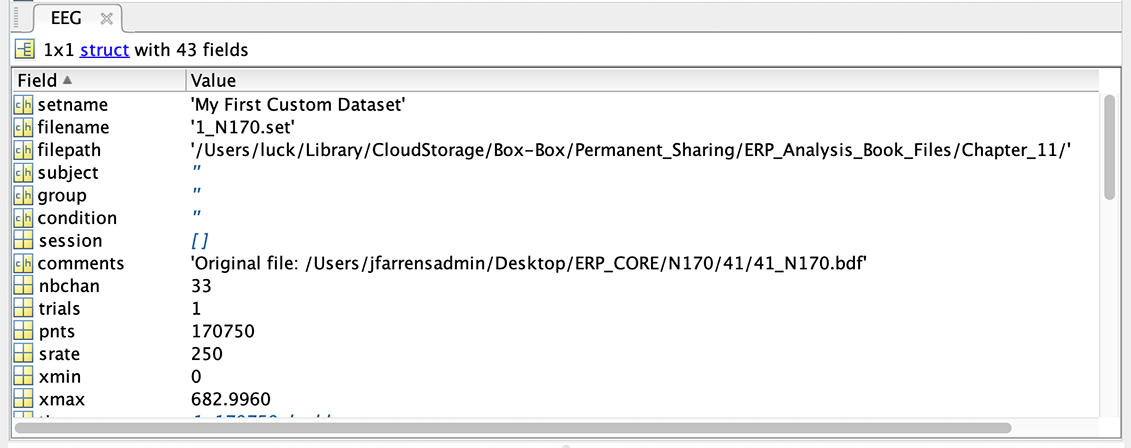
Screenshot 11.3
Another of the fields in EEG is named times, and it contains the latency in milliseconds of each time point in the dataset. Double-click it within the Variables pane to see its contents; a new tab will open labeled EEG.times, and you’ll see a very wide list of latency values. This EEGet has a sampling rate of 250 Hz, so the first point is 0 ms, the second point is 4 ms, the third point is 8 ms, etc.
Single Quotes
Click on the tab for the EEG structure and take another look at the times field. Next to the times name, you should see 1 x 170750 double. The term double is used by Matlab (and many other programming languages) to refer to a number that is stored in scientific notation (e.g., X times 10Y) using twice the traditional precision (and therefore double the amount of storage space). The 1 x 170750 part indicates that EEG.times is an array of these double-precision numbers with 1 row and 170750 columns. If you go back to the tab for EEG.times, you’ll see that it has one row and 170750 columns (one column for each data point in the dataset).
In the Matlab Variables pane, you’ll see a field within the EEG variable named data, which is listed as 33 x 170750 single. This variable stores the actual voltages in the dataset. It has 33 rows (one for each channel) and 170750 columns (one for each time point). That’s a pretty natural way to store EEG data, isn’t it? To save space, EEGLAB stores it using single-precision numbers.
When you start writing scripts, it’s easy to get confused about the rows versus the columns of an array. I find it helpful to look at the array in the Variables pane to remind myself which dimension is the rows and which is the columns.
This page titled 11.5: Exercise- The Matlab Command Line and the EEG Variable was last modified on Thu, 01 Oct 2026 18:52:38 GMT and is shared under a CC BY-NC 4.0 license and was authored, remixed, and/or curated by Steven J Luck directly on the LibreTexts platform.
The book could not be loaded just now.