Opening the book…
Now, a surprise for the unwary. Suppose I write this code:
Code \(\PageIndex{1}\) (Python):
stooges = np.array(['Larry','Beavis','Moe'])
funny_people = stooges
stooges[1] = 'Curly'
print("The stooges are: {}.".format(stooges))
print("The funny people are: {}.".format(funny_people))
Take a moment and predict what you think the output will be. Then, read it and (possibly) weep:
| The stooges are: ['Larry' 'Curly' 'Moe'].
| The funny people are: ['Larry' 'Curly' 'Moe'].
Note carefully: no Beavis.
Now the question is why. To understand this (and virtually any other tricky programming problem) you have to return once again to the memory picture. Figure 9.4.1 shows the situation immediately before, and after, the line “stooges[1] = 'Curly'” executes. Crucially, there is only one array in memory. Both variables – stooges and funny_people – are pointing at it.
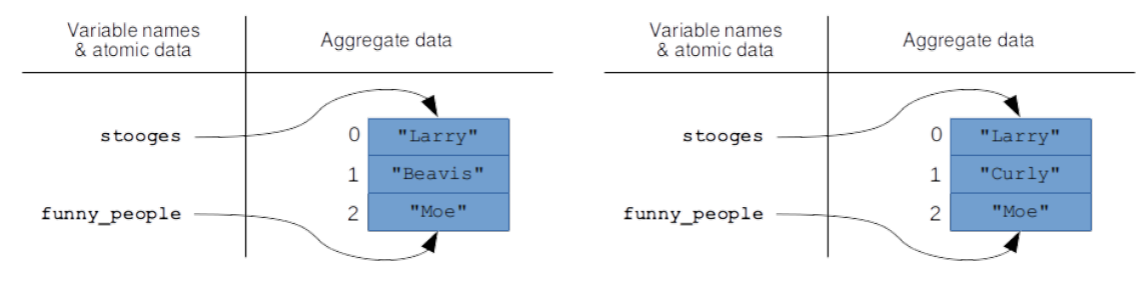
Figure \(\PageIndex{1}\): The code on p. 79 immediately before (left side) and after (right side) the line “stooges[1] = 'Curly'” is reached.
You see, if y contains aggregate (instead of atomic) data, the line “x = y” does not perform a copy operation. Instead, it just points the x variable name to the same place y is pointing to.
Once you grasp this, it’s easy to see why "Beavis" completely disappeared. There’s only one array at all, so changing stooges has the side effect of implicitly changing funny_people as well.
Actually Copying
The “point the variable to the same thing, but don’t do a copy” behavior is the default, because such copy operations are expensive (in terms of memory usage and time to execute). They’re normally not what you want anyway. Sometimes, however, you do want to produce an entire separate copy of an array, so you can modify the copy yet preserve the original. To do so, you use the .copy() method:
Code \(\PageIndex{2}\) (Python):
orig_beatles = np.array(['John', 'Paul', 'George', 'Pete'])
beatles = orig_beatles.copy()
beatles[3] = 'Ringo'
print("The Beatles were originally {}.".format(orig_beatles))
print("But the ones we all know were {}.".format(beatles))
Look carefully at that second line: it makes all the difference. Instead of making the new variable beatles point to the same array in memory that orig_beatles did, we explicitly copied the array and made beatles point to that new copy. The final memory picture is thus as per Figure 9.4.2, and the output is of course:
| The Beatles were originally ['John' 'Paul' 'George' 'Pete'].
| But the ones we all know were ['John' 'Paul' 'George' 'Ringo'].
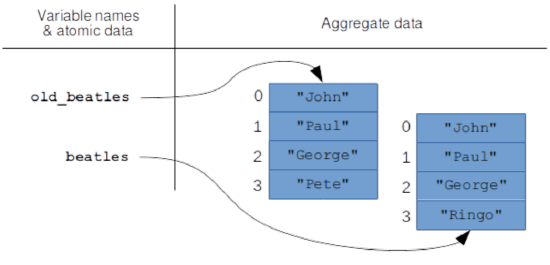
Figure \(\PageIndex{2}\): The memory picture after calling the .copy() method, instead of simply assigning to a new variable.
This page titled 9.4: Copying – and Not Copying – Arrays was last modified on Sun, 18 Sep 2022 02:06:08 GMT and is shared under a CC BY-SA 4.0 license and was authored, remixed, and/or curated by Stephen Davies (allthemath.org) via source content that was edited to the style and standards of the LibreTexts platform.
The book could not be loaded just now.