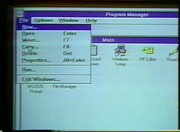
1995 VHS • Video Professor Microsoft Windows 60 FPS
The Vista Group®
Clips are not offered for this film: no licence or public-domain mark is recorded for it.
Parts
About
A Video Professor series tape covering Windows 3.1 basics, including the Program Manager, Main group programs, and Accessories. The tape opens explaining the distinction between program item icons and group icons, then covers window elements (control box, title bar, scroll bars, minimize, maximize, and restore buttons). Mouse techniques include single click, double-click, and drag for resizing and moving windows. Menus are accessed with the mouse or keyboard (Alt plus the underscored letter), and dialog boxes are demonstrated using the run command and browse button.
Program Manager features include cascade and tile window arrangements. Main group programs covered in depth include the Control Panel (color, fonts, ports, mouse, desktop, keyboard, printers, international, date and time, drivers, and sound), Print Manager, and File Manager (directory tree, drive switching, copying files by drag and drop, deleting and renaming, View menu sort options, and the move vs copy distinction). The MS-DOS prompt covers full-screen toggle with Alt+Enter, the toolbar for font changes and clipboard operations, and Alt+Tab to switch programs. The Accessories section covers Write (editing, fonts, alignment, ruler tabs, cut, copy, paste, and undo) and Paintbrush (all toolbox tools, color palette, and clipboard paste between programs).
Human-made No record of this work says a model made it. What this means.
- Archive
- Internet Archive, in The VHS Vault
- Licence or status
- The Internet Archive states none for this item.
- Credit
- The Vista Group®
- Language
- English
- Subtitles
- English (automatic)
- Who can watch
- The archive gives no rating. Invisible Network shows it to Teens profiles and older, judged from its collection and subjects. How films are placed
More from The VHS Vault
 Feature
SHIN GODZILLA (2016) English-Language Version
 Film
Pink Flamingos (1972)
 Documentary
Connections by James Burke (Seasons 1-3)
 Cartoon
VHS Recording - Cartoon Network's Cartoon Cartoon Fridays 2000 Full Broadcast
 Film
1988 VHS • Warm Up with Traci Lords VHS 60 FPS
 Film
Blue's Clues: Magenta Comes Over (2000 VHS)
 Film
Full VHS Tape: Blue's Clues: Story Time [1998]
 Film
Song Of The South (4K Restoration)
 Film
Dune ( 1984) Alternative Edition Redux [fanedit][ MKV FLAC SUBS]
 Film
Super Mario Bros: The Morton Jankel Cut (VHS Extended Rough Cut 1.0) Movie 1993
 Film
Supaidāman
 Film