Opening the book…
Processing Data
The CPU
The core of a computer is the Central Processing Unit, or CPU. It can be thought of as the “brains” of the device. The CPU carries out the commands sent to it by the software and returns results to be acted upon. The earliest CPUs were large circuit boards with limited functionality. Today, a CPU can perform a large variety of functions. There are two primary manufacturers of CPUs for personal computers: Intel and Advanced Micro Devices (AMD)

The speed (clock time) of a CPU is measured in hertz. A hertz is defined as one cycle per second. A kilohertz (kHz) is one thousand cycles per second, a megahertz (mHz) is one million cycles per second, and a gigahertz (gHz) is one billion cycles per second. The CPU’s processing power is increasing at an amazing rate.
Besides a faster clock time, today’s CPU chips contain multiple processors. These chips, known as dual-core (two processors) or quad-core (four processors), increase the processing power of a computer by providing the capability of multiple CPUs all sharing the processing load. Intel’s Core i7 processors contain 6 cores and their Core i9 processors contain 16 cores.
Faster & Cheaper
Faster and cheaper are two words that have driven the computer industry for decades. This phenomenon of “faster, cheaper” computing is often referred to as ‘Moore’s Law’, after Intel co-founder, Gordon Moore. Moore recognized that microprocessor transistor counts had been doubling every year, enabling the development of more powerful chips to be manufactured at cheaper prices.[1] Moore’s Law has been generalized into the concept that computing power will double every two years for the same price point. Another way of looking at this is to think that the price for the same computing power will be cut in half every two years. Moore’s Law has held true for over fifty years. (See image below).
The limits of Moore’s Law are now being reached and circuits cannot be reduced further, but a new law, Huang’s Law has arrived. This law, named for Nvidia’s CEO Jensen Huang, says that Graphics Processing Units (GPUs) which power artificial intelligence, are increasing faster than Moore’s Law. In fact the performance has more than doubled every year. [2]

Section Footnote Links
- Moore, G. E. (1965). Cramming more components onto integrated circuits. Electronics Magazine, 4 ↵
- Mims, C. (2020, Sept 19). Huang’s Law Is the New Moore’s Law, and Explains Why Nvidia Wants A
rm. The Wall Street Journal. https://www.wsj.com/articles/huangs-law-is-the-new-moores-law-and-explains-why-nvidia-wants-arm-11600488001 ↵
Storing Data
Random-Access Memory
When a computer boots up (starts), it begins to load information from storage into its working memory. This working memory, called Random-Access Memory (RAM), can transfer data much faster than the hard disk. Any program that you are running on the computer is loaded into RAM for processing. In order for a computer to work effectively, some minimal amount of RAM must be installed. In most cases, adding more RAM will allow the computer to run faster. Another characteristic of RAM is that it is “volatile.” This means that it can store data as long as it is receiving power. When the computer is turned off, any data stored in RAM is lost.
Hard Disk
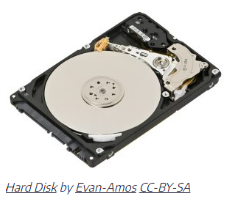
While the RAM is used as working memory, the computer also needs a place to store data for the longer term. Most of today’s personal computers use a hard disk for long-term data storage. A hard disk is considered non-volatile storage because when the computer is turned off the data remains in storage on the disk, ready for when the computer is turned on. Drives with a capacity less than 1 Terabyte usually have just one platter. Notice the single platter in the image. The read/write arm must be positioned over the appropriate track before accessing or writing data.
Solid State Drives
Solid State Drives (SSD) are becoming more popular in personal computers. The SSD performs the same function as a hard disk, namely long-term storage. Instead of spinning disks, the SSD uses flash memory that incorporates EEPROM (Electrically Erasable Programmable Read Only Memory) chips, which is much faster.

Solid-state drives are currently a bit more expensive than hard disks. However, the use of flash memory instead of disks makes them much lighter and faster than hard disks. SSDs are primarily utilized in portable computers, making them lighter, more durable, and more efficient. Some computers combine the two storage technologies, using the SSD for the most accessed data (such as the operating system) while using the hard disk for data that is accessed less frequently. SSDs are considered more reliable since there are no moving parts.
Removable Media: USB Drive
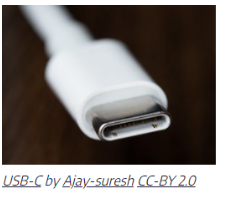
Removable storage has changed greatly over the four decades of PCs. Floppy disks have been replaced by CD-ROM drives, then they were replaced by USB (Universal Serial Bus) drives. USB drives are now standard on all PCs, and USB-C is the latest version. USB-C’s shape is oblong instead of rectangular and it is symmetrical, meaning it can be inserted either way which differs from the previous version. New specifications allow for greater data transfer speeds.[1]
Cloud Computing
In addition to the physical devices mentioned above, cloud computing offers another option for data storage. Cloud computing provides access to software applications, services and data storage through the internet. Online data storage provides many benefits including: accessibility, recovery and updates. Data is accessible from anywhere there is an internet connection and has a back-up function to mitigate the risk of data loss. As well, many service providers ensure automatic updating or syncing of data. Personal cloud storage providers include: Microsoft OneDrive, Google Drive, Dropbox. Cloud computing is explored more in a later chapter.
Brant, T. (2021, April 28). What is USB-C? An explainer. PC Magazine. https://www.pcmag.com/how-to/what-is-usb-c-an-explainer ↵
Computer Speed Factors
2.2.6: Computer Speed Factors and Data is shared under a CC BY-NC-SA license and was authored, remixed, and/or curated by LueCrecy Ragan - Arkansas State University - Beebe.
The book could not be loaded just now.