Opening the book…
Use sketching techniques to produce orthographic sketches of the following figures. For the purposes of these exercises, do not be concerned with dimensions. Concentrate on producing good, dark outlines, good circular shapes, and correctly drawn hidden and center lines.
- Sketch one orthographic view of the object shown pictorially in Figure \(\PageIndex{1}\). Remember that the holes in the gasket are circular (not elliptical as they appear in the three-dimensional sketch shown). Add a title block with the following:
- Title: Gasket
- Sk. No.: D-1/031
- Sk. by: (your name)
- Date: (today’s date)
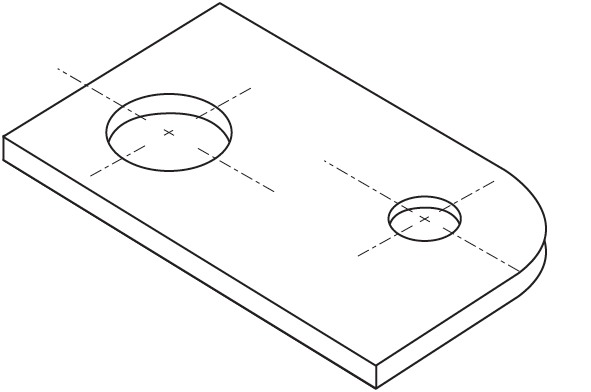
Figure \(\PageIndex{1}\): Gasket
- Sketch two orthographic views (front view and top view), in the approximate scale of the object shown pictorially in Figure \(\PageIndex{2}\). Remember to place the views correctly and make sure that all hidden lines are clearly shown. Add a title block with the following:
- Title: Stop piece
- Sk. No.: D-1/032
- Sk. by: (your name)
- Date: (today’s date)
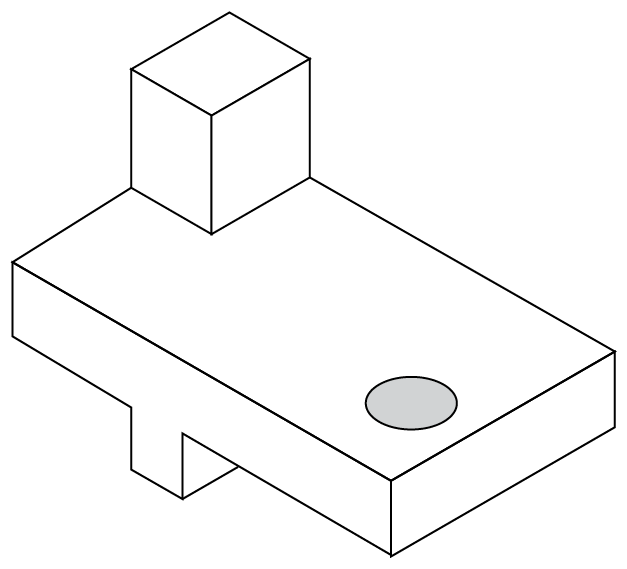
Figure \(\PageIndex{2}\): Stop piece
6.4: Make orthographic sketches is shared under a CC BY 4.0 license and was authored, remixed, and/or curated by LibreTexts.
The book could not be loaded just now.