Opening the book…
A \(\chi^{2}\) -distribution (chi-square, pronounced “ki-square”) is another special type of distribution for a continuous random variable. The sampling distribution for a variance and standard deviation follows a chi-square distribution.
Properties of the \(\chi^{2}\) -distribution density curve:
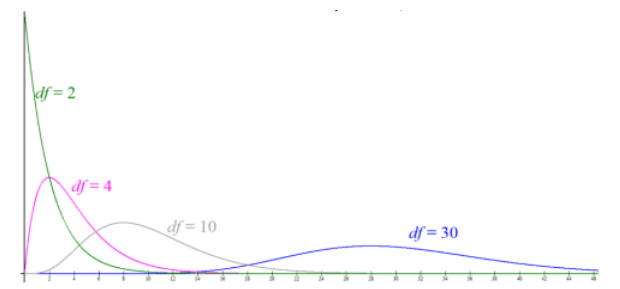
- Right skewed starting at zero.
- The center and spread of a \(\chi^{2}\) -distribution are determined by the degrees of freedom with a mean = df and standard deviation = \(\sqrt{2df}\).
- Chi-square variables cannot be negative.
- As the degrees of freedom increase, the \(\chi^{2}\) -distribution becomes normally distributed for df > 50. Figure 10-1 shows \(\chi^{2}\) -distributions for df of 2, 4, 10, and 30.
- The total area under the curve is equal to 1, or 100%.
We will use the \(\chi^{2}\) -distribution for hypothesis testing later in this chapter. For now, we are just learning how to find a critical value \(\chi_{\alpha}^{2}\).
The symbol \(\chi_{\alpha}^{2}\) is the critical value on the \(\chi^{2}\) -distribution curve with area 1 – \(\alpha\) below the critical value and area \(\alpha\) above the critical value, as shown below in Figure 10-2.

Use technology to compute the critical value for the \(\chi^{2}\) -distribution.
TI-84: Use the INVCHI2 program downloaded at Rachel Webb’s website: http://MostlyHarmlessStatistics.com. Start the program and enter the area \(\alpha\) and the df when prompted.
TI-89: Go to the [Apps] Stat/List Editor, then select F5 [DISTR]. This will get you a menu of probability distributions. Arrow down to Inverse > Inverse Chi-Square and press [ENTER]. Enter the area 1 – \(\alpha\) to the left of the \(\chi\) value and the df into each cell. Press [ENTER].
Excel: =CHISQ.INV(1 – \(\alpha\), df) or =CHISQ.INV.RT(\(\alpha\), df)
Alternatively, use the following online calculator: https://homepage.divms.uiowa.edu/~mbognar/applets/chisq.html.
Compute the critical value \(\chi_{\alpha}^{2}\) for a \(\alpha\) = 0.05 and df = 6.
Solution
Start by drawing the curve and determining the area in the right-tail as shown in Figure 10-3. Then use technology to find the critical value.

In Excel there are two options. Use =CHISQ.INV(area in left-tail,df) or right-tail =CHISQ.INV.RT(area in righttail,df). For this example, then we would have \(\chi_{\alpha}^{2}\) =CHISQ.INV(0.95,6) or =CHISQ.INV.RT(0.05,6) = 12.5916.
TI-89 use Distr > Inverse Chi-square with area 0.95 and df = 6

This page titled 11.1: Chi-Square Distribution was last modified on Thu, 12 Jun 2025 19:18:01 GMT and is shared under a CC BY-SA 4.0 license and was authored, remixed, and/or curated by Rachel Webb via source content that was edited to the style and standards of the LibreTexts platform.
The book could not be loaded just now.