Opening the book…
Understanding Bar Graph
A bar chart is a visualization of categorical data that consists of a series of rectangles arranged side by side (but not touching). Each rectangle corresponds to a category. All of the rectangles have the same width. The height of each rectangle corresponds to either the number of units in the corresponding category or the proportion of the total units that fall into the category.
Example \(\PageIndex{1}\): Understanding Bar Graph
Students in a statistics class were asked to list their majors. A bar graph is drawn to visualize this data. Answer the following questions.
- How many people participated in the survey?
- How many more people plan to major in Biology than in Education?
- Is the data on the horizontal axis categorical or quantitative?
- Is this graph a bar chart, a histogram, or a Pareto chart?
- What is the proportion of students who plan to major in Education?
- What percentage of students are unsure about their major?

- Answer
-
- \(6+1+3+2+4=16\)
- \(6-1=5\) More students are majoring in Biology than in Education.
- Categorical (Qualitative)
- Not a histogram. Not a Pareto chart.
- \(\frac{1}{16}=0.0625\)
- \(\frac{4}{16}=0.25=25\%\)
Your Turn \(\PageIndex{1}\): Average Monthly Precipitation
If the data we’re visualizing is categorical, we want a quick way to graphically represent the relative numbers of units in each category. When we created the frequency distributions in the last section, we simply counted the number of units in each category and recorded that count (the frequency of that category). Frequencies are nice when we’re organizing and summarizing data; they’re easy to compute, and they’re always whole numbers. But they can be difficult to understand for an outsider who’s being introduced to your data.
Let’s get some practice reading bar graphs.
Example \(\PageIndex{2}\): Reading Bar Graph
The bar graph shows data on cars from the \(2020\) model year available in the United States. Analyze the graph to answer the following questions.
- What proportion of available cars were sports cars?
- What proportion of available cars were sedans?
- Which categories of cars each made up less than \(5\%\) of the models available?
- Answer
-
- The bar for sports cars goes up to \(10\%\), so the proportion of models that are considered sports cars is 10%.
- The bar corresponding to sedan goes up past \(30\%\) but not quite to \(35\%\). It looks like the proportion we want is between \(33\%\) and \(34\%\).
- We’re looking for the bars that don’t make it all the way to the \(5\%\) line. Those categories are hatchback and wagon.
Understanding Pie Charts
A pie chart consists of a circle divided into wedges, with each wedge corresponding to a category. The proportion of the area of the entire circle that each wedge represents corresponds to the proportion of the data in that category. Pie charts are difficult to create without technology because they require careful angle measurements and precise circles, both of which are tasks better suited to computers.
Example \(\PageIndex{4}\): Construct Pie Chart
Use the data that follows to generate a pie chart.
| Type | Percent | Type | Percent |
|---|---|---|---|
| SUV | \(43.6\%\) | Minivan | \(5.5\%\) |
| Sedan | \(33.6\%\) | Hatchback | \(3.6\%\) |
| Sports | \(10.0\)% | Wagon | \(3.6\%\) |
- Answer
-
First, enter the chart above into a new sheet in Google Sheets. Next, click and drag to select the full table (including the header row). Click on the “Insert” menu, then select “Chart.” The result may be a pie chart by default; if it isn’t, you can change it to a pie chart using the “Chart type” drop-down menu in the Chart Editor.
Figure \(\PageIndex{3}\) (data source: consumerreports.org/cars)
Florence Nightingale (1820–1910) is best remembered today for her contributions in the medical field; after witnessing the horrors of field hospitals that tended to the wounded during the Crimean War, she championed reforms that encouraged sanitary conditions in hospitals. For those efforts, she is today considered the founder of modern nursing.
Figure \(\PageIndex{4}\): Florence Nightingale's significant contribution to the field of statistical graphics cannot be understated. (credit: "Florence Nightingale" by Library of Congress Prints and Photographs Division/Library of Cogress(opens in new window) [hdl.loc.gov], public domain)
Nightingale is also remembered for her contributions in statistics, especially in the ways we visualize data. She developed a version of the pie chart that is today known as a polar area diagram, which she used to visualize the causes of death among the soldiers in the war, highlighting the number of preventable deaths the British Army suffered in that conflict.In 1859, the Royal Statistical Society honored her for her contributions to the discipline by electing her to join the organization. She was the first woman to be so honored. She was later named an honorary member of the American Statistical Association. Nightingale's status as a revered pioneer in both nursing and statistics is a complex one, because some of her writings and opinions demonstrate a colonialist mindset and disregard for those who lost their lives and lands at the hands of the British. Her core statistical writings indicated that she felt superior to the Indigenous people she was treating. Members of both fields continue to debate her near-iconic role.
Understating Histogram
Quantitative, or numerical, data can also be summarized into frequency tables and graphs. A representation of quantitative data is called a histogram. The horizontal axis is a number
Some words we use to describe distributions are uniform (data are equally distributed across the range), symmetric (data are bunched up in the middle, then taper off in the same way above and below the middle), left-skewed (data are bunched up at the high end or larger values, and taper off toward the low end or smaller values), and right-skewed (data are bunched up at the low end, and taper off toward the high end). See the figures below.
1. Symmetric Distribution
A distribution is symmetric if the left and right sides of the graph are approximate mirror images of each other when divided down the center
Key Characteristic: If you fold the graph in half, the two halves match closely.
Primary Clustering: Center
2. Skewed Right (Positively Skewed)
A distribution is right-skewed when the tail of the distribution extends much farther to the right (toward larger values) than to the left.
Key Characteristics: The bulk of the data values are clustered on the left side
Primary Clustering: Left
3. Skewed Left (Negatively Skewed)
A distribution is skewed left when the tail of the graph extends much farther to the left (toward smaller values) than to the right.
Key Characteristic: The bulk of the data values are clustered on the right side
Primary Clustering: Right
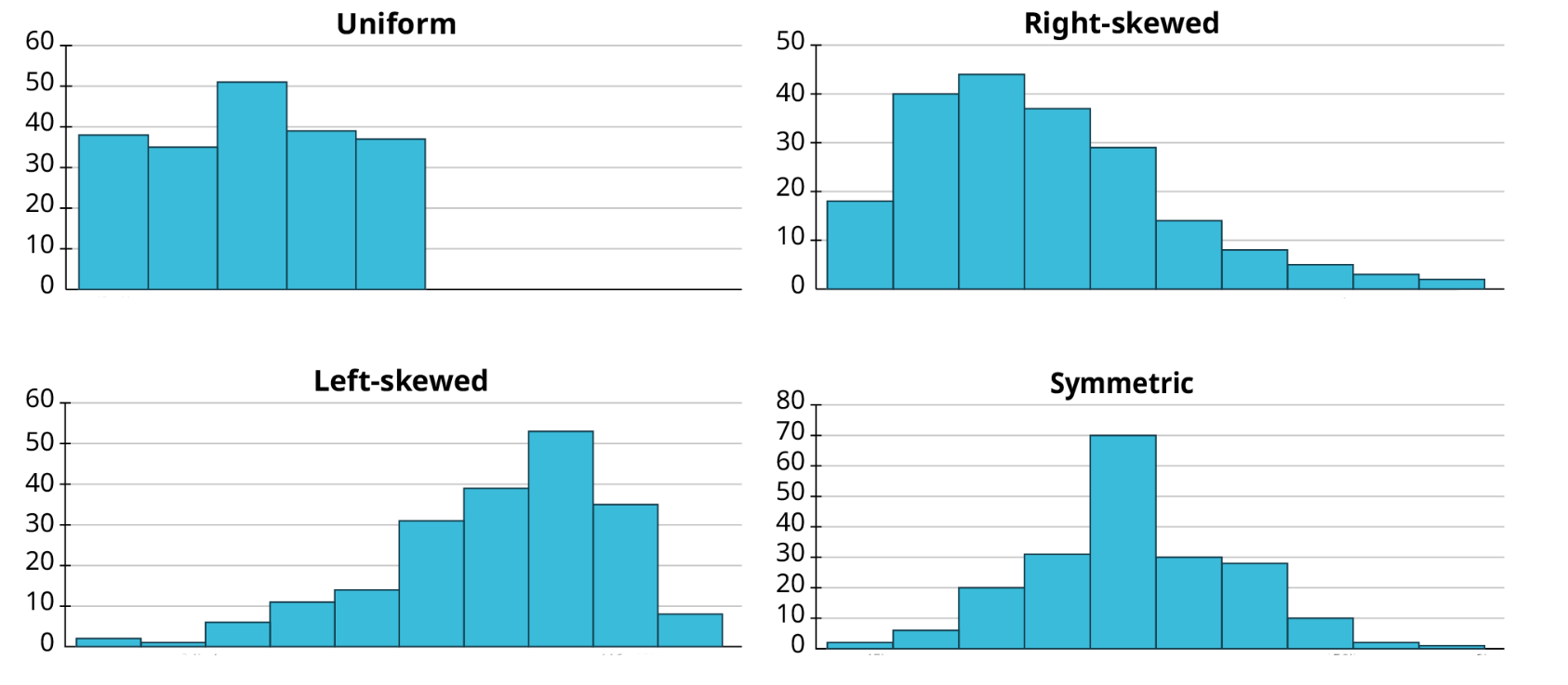
The following graph shows the three histograms above (right-skewed, left-skewed, and symmetric).

Looking back at the stem-and-leaf plot in the previous example, we can see that the data are bunched up at the low end and taper off toward the high end; that set of data is right-skewed. Knowing the distribution of a set of data gives us useful information about the property that the data are measuring.
Example \(\PageIndex{6}\): Find Information from Histogram
The data in “AvgSAT”(opens in new window) contains the average SAT score for students attending every institution of higher learning in the US for which data is available. Create a histogram in Google Sheets of the average SAT scores. Use bins of width \(50\). Are the data uniformly distributed, symmetric, left-skewed, or right-skewed?
- Answer
-
The data are fairly symmetric, but slightly right-skewed.
Misleading Graphs and Charts
Graphical representations of data can be manipulated to intentionally mislead the reader. Graphs can mislead by truncating the vertical axis (exaggerating differences), using unequal bar widths, or creating pie charts whose percentages exceed \(100\%\). Let’s look at the following examples. The following graph in figure \(\PageIndex{8}\) is misleading.
-
Truncated Y-Axis: The vertical axis starts at \(80\) instead of zero. This baseline truncation distorts proportional comparisons, making the jump from \(82.3\) to \(92.7\) appear as a \(400\%\) visual increase (the bar graph's height) rather than the actual \(12.6\%\) growth.
-
Selective Scale Windowing: By tightly framing the scale between \(80\) and \(100\), subtle fluctuations are blown out of proportion to mimic steep upward momentum.
-
Superimposed Exaggerated Visuals: Adding an upward-curving trend arrow exaggerates the rate of progress beyond what the underlying data points support.
-
Sensationalized Framing: Phrases like "Skyrocketing Progress!" prime the viewer to perceive dramatic change before evaluating the underlying numbers

The table below shows the teams and their payrolls in the English Premier League, the top soccer organization in the United Kingdom.
You should notice that despite using the same data, these two graphs look strikingly different. In the second graph, the gap between Manchester United and the other four teams appears significantly larger than in the first. The scale on the vertical axis has been manipulated here. The first graph's axis starts at zero, while the lowest value on the second graph's axis is \(120\). This trick has a strong impact on the viewer’s perception of the data.
A poll was taken to ask people whether they agreed with the positions of the \(4\) candidates for a county office. Does the pie chart accurately represent this data?
No: Because the total percentage adds up to more than \(100\%\). The following two figures: Figure \(\PageIndex{10}\) and Figure \(\PageIndex{11}\) show how the pie chart could be misleading.


5.4: Understanding Statistical Graphs and Tables is shared under a not declared license and was authored, remixed, and/or curated by LibreTexts.
The book could not be loaded just now.