Opening the book…
By Carey A. Smith

Figure \(\PageIndex{i}\): MATLAB User Interface's Initial Working Directory
You should keep your files in a directory that is different from MATLAB's default directory. This figure shows you how to change MATLAB's working directory to be your directory.
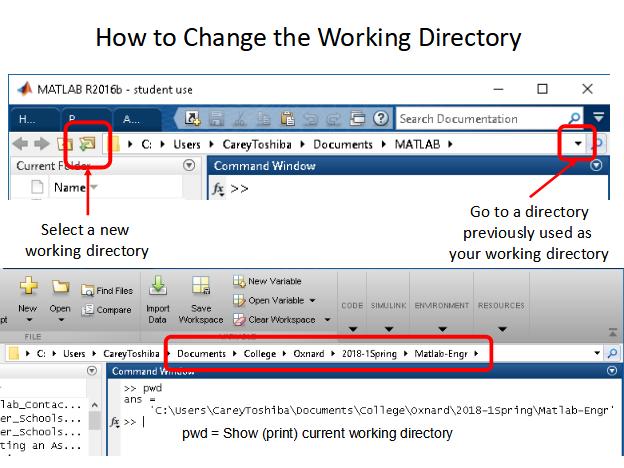
Figure \(\PageIndex{i}\): How to Change MATLAB's Working Directory

Figure \(\PageIndex{i}\): Opening and Saving m-Files in MATLAB User Interface's Initial Working Directory

Figure \(\PageIndex{i}\): Setting the Font in MATLAB
This page titled 1.4: MATLAB User Interface was last modified on Wed, 31 Aug 2022 01:13:56 GMT and is shared under a CC BY-NC-SA 4.0 license and was authored, remixed, and/or curated by Carey Smith.
The book could not be loaded just now.