Opening the book…
Mondrian offers a number of contextual interaction mechanisms. The interaction object contains a number of keywords for that purpose. The message highlightWhenOver: takes a block as argument. This block returns a list of the nodes to highlight when the mouse enters a node. Consider the example:
view interaction
    highlightWhenOver: [:v | {v - 1 . v + 1. v + 4 . v - 4}].
view shape rectangle
    width: 40;
    height: 30;
    withText.
view nodes: (1 to: 16).
view gridLayout gapSize: 2.
Entering the node 5 highlights the nodes 4, 6, 1 and 9. This mechanism is quite efficient to not overload with connecting edges. Only the information is shown for the node of interest.
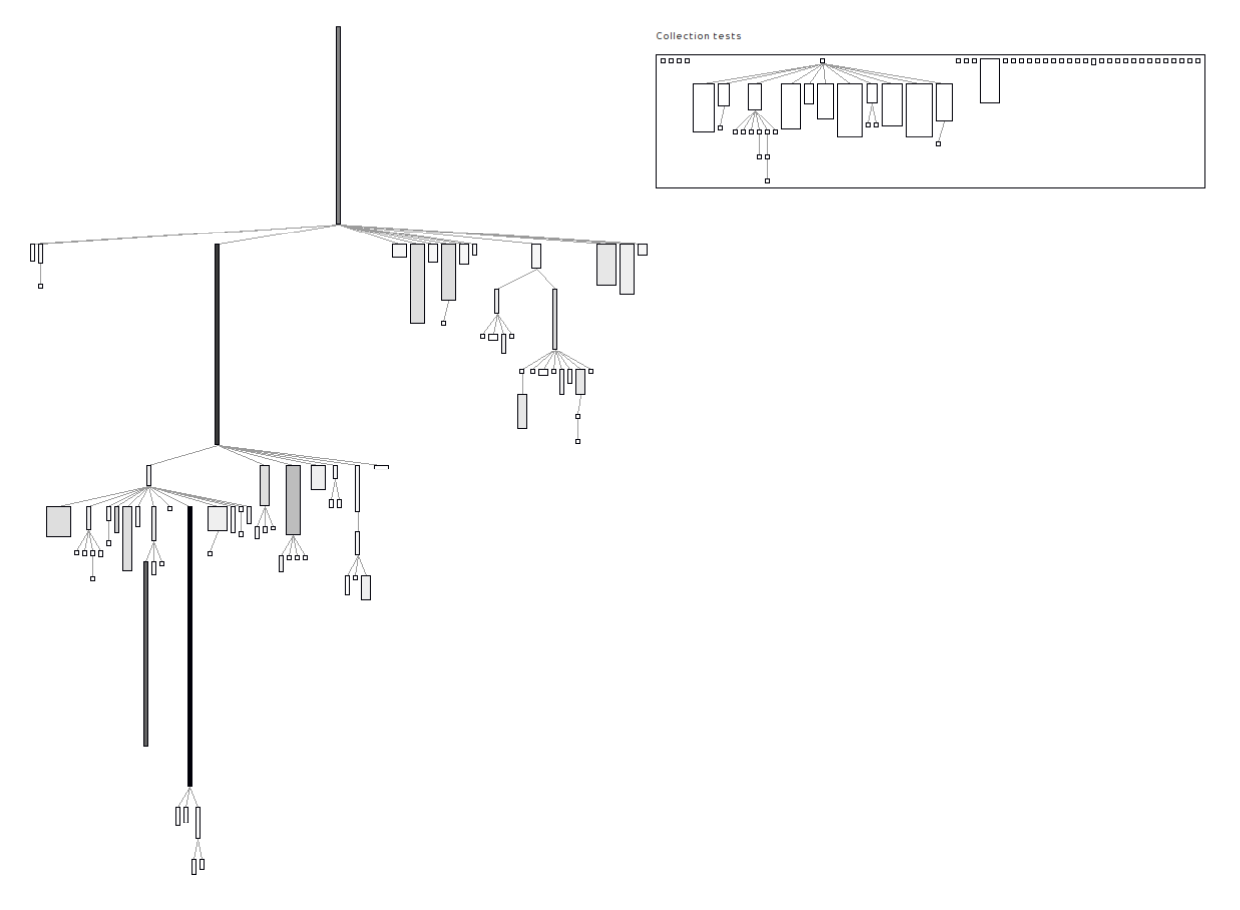
A more compelling application of highlightWhenOver: is with the following example. A hierarchy of class is displayed on the left hand side. On the right hand size a hierarchy of unit tests is displayed. Locating the mouse pointer above a unit test highlights the classes that are referenced by one of the unit test methods. Consider the (rather long) script:
"System complexity of the collection classes"
view shape rectangle
    width: [ :each | each instVarNames size * 5 ];
    height: [ :each | each methods size ];
    linearFillColor: #numberOfLinesOfCode within: Collection withAllSubclasses.
view nodes: Collection withAllSubclasses.
view edgesFrom: #superclass.
view treeLayout.

"Unit tests of the package CollectionsTest"
view shape rectangle withoutBorder.
view node: 'compound' forIt: [
    view shape label.
    view node: 'Collection tests'.

    view node: 'Collection tests' forIt: [
        | testClasses |
        testClasses := (PackageInfo named: 'CollectionsTests') classes reject: #isTrait.
        view shape rectangle
            width: [ :cls | (cls methods inject: 0 into: [ :sumLiterals :mtd | sumLiterals + mtd
                allLiterals size]) / 100 ];
            height: [ :cls | cls numberOfLinesOfCode / 50 ].
        view interaction
            highlightWhenOver: [ :cls | ((cls methods inject: #()
                    into: [:sum :el | sum , el allLiterals ]) select: [:v | v isKindOf: Association ]
            thenCollect: #value) asSet ].
        view nodes: testClasses.
        view edgesFrom: #superclass.
        view treeLayout ].

    view verticalLineLayout alignLeft
].
The script contains two parts. The first part is the ubiquitous system complexity of the collection framework. The second part renders the tests contained in the CollectionsTests. The width of a class is the number of literals contained in it. The height is the number of lines of code. Since the collection tests makes a great use of traits to reuse code, these metrics have to be scaled down. When the mouse is placed over a test unit, then all the classes of the collection framework referenced in this class are highlighted.
This page titled 11.12: Interaction was last modified on Mon, 26 Jul 2021 15:16:49 GMT and is shared under a CC BY-SA 3.0 license and was authored, remixed, and/or curated by Alexandre Bergel, Damien Cassou, Stéphane Ducasse, Jannik Laval (Square Bracket Associates) via source content that was edited to the style and standards of the LibreTexts platform.
The book could not be loaded just now.