Opening the book…
An assignment statement creates a new variable and gives it a value:
>>> message = 'And now for something completely different'
>>> n = 17
>>> pi = 3.1415926535897932
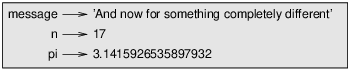
This example makes three assignments. The first assigns a string to a new variable named message; the second gives the integer 17 to n; the third assigns the (approximate) value of \(\pi\) to pi.
A common way to represent variables on paper is to write the name with an arrow pointing to its value. This kind of figure is called a state diagram because it shows what state each of the variables is in (think of it as the variable’s state of mind). Figure \(\PageIndex{1}\) shows the result of the previous example.
This page titled 2.1: Assignment statements was last modified on Tue, 01 Dec 2020 03:30:50 GMT and is shared under a CC BY-NC 3.0 license and was authored, remixed, and/or curated by Allen B. Downey (Green Tea Press) via source content that was edited to the style and standards of the LibreTexts platform.
The book could not be loaded just now.