Opening the book…
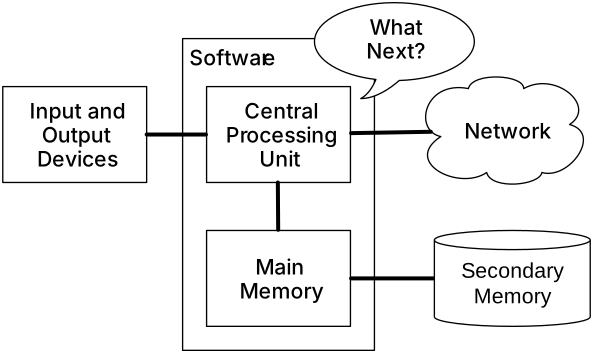
So far, we have learned how to write programs and communicate our intentions to the Central Processing Unit using conditional execution, functions, and iterations. We have learned how to create and use data structures in the Main Memory. The CPU and memory are where our software works and runs. It is where all of the "thinking" happens.
But if you recall from our hardware architecture discussions, once the power is turned off, anything stored in either the CPU or main memory is erased. So up to now, our programs have just been transient fun exercises to learn Python.
Secondary Memory
In this chapter, we start to work with Secondary Memory (or files). Secondary memory is not erased when the power is turned off. Or in the case of a USB flash drive, the data we write from our programs can be removed from the system and transported to another system.
We will primarily focus on reading and writing text files such as those we create in a text editor. Later we will see how to work with database files which are binary files, specifically designed to be read and written through database software.
This page titled 7.1: Persistence was last modified on Tue, 01 Dec 2020 03:50:54 GMT and is shared under a CC BY-NC-SA 4.0 license and was authored, remixed, and/or curated by Chuck Severance via source content that was edited to the style and standards of the LibreTexts platform.
The book could not be loaded just now.