Opening the book…

6.3.1. Networks in many sizes
Networks come in all sizes. They can go from basic networks consisting of two PCs to networks interfacing with many gadgets.
Basic networks introduced in homes empower sharing of assets, for example, printers, archives, pictures, and music between a couple of nearby PCs. Worldwide internet users expect always to stay connected to the internet. They expect their connected devices to do the following:
- Stay connected to the internet to complete their work.
- Have the ability to send and receive data fast.
- Have the ability to send small and large quantities of data globally via any device connected to the internet.
Home office networks and small office networks are regularly set up by people who work from home or remote offices. They need to associate with a corporate network or other concentrated assets. Moreover, numerous independently employed business people utilize home office and small office networks to publicize and sell items, request supplies and speak with clients.
Despite return-to-office (RTO) mandates from major employers, new federal data suggests remote work has settled into a lasting feature of the U.S. workplace rather than a temporary pandemic-era trend.
According to the U.S. Bureau of Labor Statistics’ latest American Time Use Survey, 34.9% of full-time workers — approximately 32.5 million people — performed at least part of their job from home on an average day in 2025. That marks a modest increase from 33.4% in 2024 and leaves remote work participation more than 10 percentage points above pre-pandemic levels.
The findings indicate that while many organizations have pushed employees back to the office, those efforts have largely plateaued. The latest figures add to a growing body of evidence suggesting hybrid work has become a permanent feature of the labor market rather than an exception.
The Internet is the biggest network presently. Indeed, the term Internet implies an interconnected network of networks. The Internet is the global worldwide network that connects billions of computers around the world. A computer can connect to another computer in a different country via the internet.
Let us see three types of computer networks:
- Geographical area networks,
- Access level networks, and
- Special purpose networks.
Geographical area networks
Typically, geographical areas define computer networks. A local area network (LAN) connects computers within a defined physical space, while a wide area network (WAN) can connect computers across continents.
However, networks are also defined by the protocols they use to communicate, the physical arrangement of their components, how they manage network traffic and the purpose they serve in their respective environments.
The network types by geographical area are distinguished by the area they cover.
Body area network (BAN)
A BAN is a wireless network of wearable computing devices. It is also referred to as a wireless body area network (WBAN).
Personal area network (PAN)
A PAN serves one person. If a user has multiple devices from the same manufacturer (an iPhone and a MacBook, for instance), it’s likely they've set up a PAN. The PAN shares and syncs content, text messages, emails, photos and more, across devices.
Local area network (LAN)
A LAN connects computers over a relatively short distance, such as those within an office building, school or hospital. LANs are typically privately owned and managed.
Metropolitan area network (MAN)
MANs are larger than LANs but smaller than WANs. Cities and government entities typically own and manage MANs.
Major Cities with Extensive Public Wi-Fi
- Seoul, South Korea: Offers dense public Wi-Fi coverage across streets, public transit, and tourist hubs via government-backed networks.
- Barcelona, Spain: Features one of Europe's largest municipal Wi-Fi networks, blanketing parks, plazas, beaches, and municipal buildings.
- Taipei, Taiwan: Provides thousands of free hotspots across public areas, transit stations, and major commercial districts.
- Singapore: Delivers extensive Wireless@SG coverage across public housing estates, malls, MRT stations, and civic spaces.
Wide area network (WAN)
As the name implies, a WAN connects computers across large geographical areas, such as regions and continents. WANs often have collective or distributed ownership models for network management purposes.
Cloud network
A cloud network is a type of wide-area network (WAN) where networking resources—such as routers, firewalls and switches—are virtualized and delivered through public or private cloud platforms.
Unlike traditional WANs, which depend heavily on physical infrastructure, cloud networks offer on-demand scalability, automation and global availability. These networks are ideal for businesses running applications in hybrid or multicloud environments because they allow seamless and secure connectivity between cloud services and on-premises systems.

| Understanding different Network types. Image created by Luis R Castellanos, Public Domain, from Google Gemini. |
Access level networks
The Internet, Intranet, and Extranet are grouped by their access level, meaning who can use them, and their scope of security. They form a tiered structure based on public and private network boundaries.
Internet
Open to the public. Anyone in the world can connect. Global reach with no central owner. Security is up to each user.
The Internet is an overall assortment of interconnected networks.
A portion of the LAN models is associated with one another through a WAN association. WANs are then associated with one another. The WAN association lines speak to all the assortments of ways we interface networks. WANs can connect through copper wires, fiber optic cables, and wireless transmissions.
No individual or group own the Internet. Guaranteeing compelling correspondence over this various framework requires the use of steady and generally perceived advances and norms, just as the collaboration of many network organization offices. Some associations have been produced to keep up the structure and normalization of Internet conventions and procedures.
These organizations incorporate the Internet Engineering Task Force (IETF), Internet Corporation for Assigned Names and Numbers (ICANN), and the Internet Architecture Board (IAB), in addition to numerous others.
Intranet
Intranet is a term frequently used to describe a private association of LANs and WANs that has a place with an association.
It is intended to be available only for approved individuals, workers, or others of an organization. Only internal staff and employees can log in. Fully private and protected by company firewalls.

| PGCC Intranet menu (MyPGCC). Image by Luis R Castellanos, Public domain, Own work. |
 |
 |
| PGCC Student Menu. Image by Luis R Castellanos, Public Domain, own work. | PGCC Faculty and Staff Menu. Image by Luis R Castellanos, Public Domain, own work. |
Extranet
An extranet is a term used to describe the case when an organization wants to give secure and safe access to people who work for another organization yet expect access to the association's information.
Shared with specific outsiders. Trusted partners, vendors, and clients get access. Semi-private. Uses the public web as a bridge, but blocks the general public using secure passwords and VPNs.
Examples of extranets include:
- An organization that is giving access to outside providers and temporary workers.
- An emergency clinic gives a booking system to specialists so they can make arrangements for their patients.
- A nearby office of training gives spending plans and staff data to the schools in its region.
| Aspect | Internet | Intranet | Extranet |
|---|---|---|---|
| Accessibility | Accessible to anyone with internet connection | Restricted to authorized users within organization | Extends access to select external stakeholders with controlled permissions |
| Audience | Global audience, including individuals, businesses, organizations | Internal users within the organization | A mix of select internal users and external members |
| Security | Varies; may include encryption, firewalls, secure connections | Stringent access controls, user authentication, encryption | Authentication mechanisms, role-based permissions, encryption |
| Usage | Communication, research, entertainment, e-commerce, etc. | Internal communication, collaboration, knowledge sharing, workflows | Collaboration, secure data exchange, client/vendor interaction |
| Key differences between the internet, intranet, and extranet. Thoughtfarmer. |

| Networks according to the access level. Image by Luis R Castellanos. Public Domain, own work. |
Special Purpose Networks
WLAN (Wireless LAN)
A LAN that uses radio waves like Wi-Fi instead of physical cables.
SAN (Storage Area Network)
A high-speed network that links servers to data storage devices.
VPN (Virtual Private Network)
A secure tunnel that lets you connect safely to a private network over a public one like the internet.
6.3.2. Clients and Servers
All PCs associated with a network are named hosts. Hosts are also called end devices. Servers are PCs with programming that empower them to give data, similar to emails or website pages, to other network devices called clients. Each assistance requires separate server programming.
For instance, a server requires web server programming to give web administrations to the network. A PC with server programming can offer types of assistance at the same time to one or numerous customers.
Furthermore, a solitary PC can run numerous sorts of server programming. It might be vital for one PC to go about as a document server, a web server, and an email server in a home or private company. Clients are PCs with programming introduced that empower them to ask for and show the server's data.
A case of client programming is an internet browser, similar to Chrome or Firefox. A solitary PC can likewise run different kinds of custom programming. For instance, a client can browse email and view a site page while texting and tuning in to Internet radio.
A client-server network is a computing model in which multiple clients connect to a central server to access resources, such as files, applications, and data.
The server acts as a central hub, managing and providing services to the connected clients.
In a client-server network, clients send requests to the server, which processes these requests and sends back the requested information or performs the necessary tasks. The server handles tasks like data storage, security, and resource management, while the clients focus on interacting with the user.
6.3.3. Network Components
The link between the sender and the receiver can be as simple as a single cable connection between these two devices or more sophisticated as a set of switches and routers between them. The network framework contains three classes of network segments:
- Devices
- Media
- Services
Devices and media are the physical components, or equipment, of the network. Equipment is regularly the noticeable segment of the network stage, for example, a PC, switch, remote passageway, or the cabling used to associate the devices.
Administrations incorporate a significant number of the basic network applications individuals utilize each day, similar to email facilitating administrations and web facilitating administrations.
Procedures give the usefulness that coordinates and moves the messages through the network. Procedures are more subtle to us yet are basic to the activity of networks.
End Devices
An end device is either the source or destination of a message transmitted over the network.
Each end device is identified by an IP address and a physical address. Both addresses are needed to communicate over a network. IP addresses are unique logical IP addresses that are assigned to every device within a network. If a device moves from one network to another, then the IP address has to be modified.
Physical addresses, also known as MAC (Media Access Control) addresses, are unique addresses assigned by the device manufacturers. These addresses are permanently burned into the hardware.

| Modem Router´s MAC address. Image by Luis R Castellanos, Public Domain, own work. |
Intermediary Network Devices
Some devices act as intermediaries between devices. They are called delegated devices. These delegated devices give availability and guarantee that information streams over the network.
Intermediary network devices are hardware components that connect end devices and manage how data flows across a computer network.
Routers use the destination end device address, related to data about the network interconnections, to decide how messages should take through the network.
Some Intermediary Network devices:
- Bridge: A network device that connects two networks and only allows packets through that are needed.
- Hub: A simple network device connects other devices to the network and sends packets to all the devices connected to it.
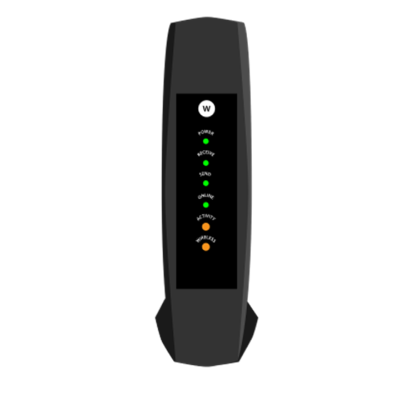
- Modem: is a hardware device that connects your home or office network to your Internet Service Provider (ISP).
- Router: A device that receives and analyzes packets and then routes them towards their destination. In some cases, a router will send a packet to another router; it will send it directly to its destination in other cases.
- Modem-router: is a single device that performs the jobs of both a modem and a router. It connects your home to your internet provider and creates your local Wi-Fi network at the same time.
- Switch: A network device that connects multiple devices and filters packets based on their destination within the connected devices.
 |
 |
 |
 |
|
Modem Image by Wilton de Carvalho, GNU FDL, from Wikimedia Commons |
Router |
Modem/Router |
Switch |

Network Media
A medium called network media carries the act of transport data.
The medium gives the channel over which the message makes a trip from source to destination.
Present-day organizations basically utilize three sorts of media to interconnect devices and give the pathway over which information can be transmitted.
These media are:
- Metallic wires within cables (Copper) - information is encoded into electrical driving forces.
- Glass or plastic fibers (fiber optic cable) - information is encoded as beats of light.
- Wireless transmission - information is encoded utilizing frequencies from the electromagnetic range.
Various sorts of network media have various highlights and advantages. Not all network media have similar qualities, nor are they all appropriate for the same purpose.
 |
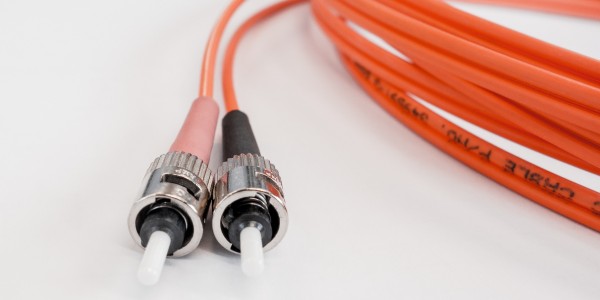 |
| Copper cables. Image by Kier in Sight Archives from Unsplash | Fiber Optic cable. Image by blickpixel from Pixabay. |
Bluetooth
While Bluetooth is not generally used to connect a device to the Internet, it is an important wireless technology that has enabled many functionalities that are used every day.
When created in 1994 by Ericsson, it was intended to replace wired connections between devices. Today, it is the standard method for connecting nearby devices wirelessly.
Origin of the name
“King Harald Bluetooth…was famous for uniting Scandinavia just as we intended to unite the PC and cellular industries with a short-range wireless link.”
Bluetooth was only intended as a placeholder until marketing could come up with something really cool.
King Harald's dead tooth, which was a dark blue/grey color, earned him the nickname Bluetooth.
The Bluetooth logo is a bind rune merging the Younger Futhark runes (Hagall) (ᚼ) and (Bjarkan) (ᛒ), Harald’s initials.

| Bluetooth logo with runes. Image by Luis R Castellanos, Public Domain, own work. |
Bluetooth has a range of approximately 300 feet and consumes very little power, making it an excellent choice for various purposes. Initially, Bluetooth was under the IEEE 802.15.1. Now Bluetooth is under the Bluetooth Special Interest Group (SIG).
| Bluetooth official page |
Some applications of Bluetooth include: connecting a printer to a personal computer, connecting a mobile phone and headset, connecting a wireless keyboard and mouse to a computer, and connecting a remote for a presentation made on a personal computer.

| Bluetooth official logo. By Bluetooth SIG, Public domain, from Wikimedia Commons |
.svg)
6.3.4. Network Representations
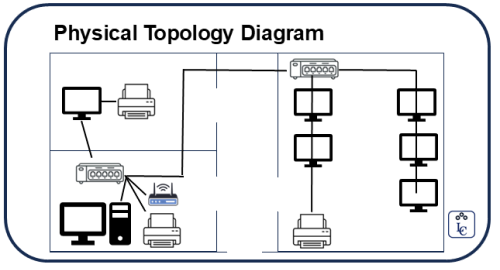
To draw a diagram of a network, symbols are utilized by network professionals to represent the different devices and connections which make up a network. A diagram gives a simple method to see how devices in a huge network are associated. This kind of "picture" of a network is known as a topology diagram.
Network topology refers to the physical and logical arrangement of nodes and connections in a computer network, which governs how data flows between devices.
The capacity to perceive the legitimate portrayals of the physical systems administration segments is basic to have the option to imagine the association and activity of a network.
Topology Diagrams
Understanding topology diagrams are required for anybody working with a network. They give a visual guide of how the network is associated. There are two types of Topology diagrams:
- Physical topology diagrams. Identifies the physical location of intermediary devices and cable installation. It is how they are interconnected with cables and wires physically.
- Logical topology diagrams. Identifies devices, addressing schemes, and ports. It is how connected devices are seen to the user.
 |
 |
| Physical Topology Diagram. By Luis R Castellanos, Public Domain, own work. | Logical Topology Diagram. By Luis R Castellanos, Public Domain, own work. |
Types of Network topologies
Point-to-point: It consists of two nodes that are connected by a single link. Data travels back and forth between these two endpoints.
Bus: all nodes are connected to a single cable—known as the bus or backbone—like bus stops branching off from a bus route. Data travels in both directions along the cable.
Ring: nodes are connected in a circular fashion, with each node having exactly two neighbors. Data flows in one direction around the ring, though dual-ring systems can send data in both directions.
Mesh: each node is directly linked to multiple other nodes. In a full mesh configuration, every node connects to every other node within a single network, creating redundant paths for data transmission.
.png?revision=1)
| Bus, Ring, Mesh network topologies. Image by Luis R Castellanos, Public Domain, own work. |
Star: all the nodes are connected to a central hub. The nodes are positioned around that central hub in a shape that roughly resembles a star.
Tree: combines elements of both bus and star networks, creating a hierarchical structure. In this configuration, a central hub serves as the root node, connecting to multiple star networks rather than individual nodes.
Hybrid: combines elements of different topologies to meet specific needs.
.png?revision=1)
| Star, Tree, Hybrid network topologies. Image by Luis R Castellanos, Public Domain, own work. |

ASCCC. Information Systems for Business. Libretexts. 2021. Link.
Batke, Kelly. Intranet vs internet vs extranet: a comparative guide. Thoughtfarmer. 2026. Link.
Goodwin, Michael. What is network topology? IBM. Link.
IBM. What is computer networking? Link.
Lenovo. What is a client-server network? Link.
PGCC. INT1010: Concepts in Computing. Libretexts. 2021. Link.
Wikipedia. Body Area Network. Link.
| Banner image by Missouri State Archives, Public domain, via Wikimedia Commons |
_(20940847762).jpg)
This page titled 6.3: Providing Resources in a Network was last modified on Fri, 04 Sep 2026 16:12:31 GMT and is shared under a CC BY-NC-SA 4.0 license and was authored, remixed, and/or curated by Luis Castellanos Hurtado.
The book could not be loaded just now.