Opening the book…

Web development is an evolving amalgamation of languages that work in concert to receive, modify, and deliver information between parties using the Internet as a mechanism of delivery. While it is easy to describe conceptually, implementation is accompanied by an overwhelming variety of languages, platforms, templates, frameworks, guidelines, and standards. Navigating a project from concept to completion often requires more than mastery of one or two complementing languages, meaning today’s developers need both breadths, and depth, of knowledge to be effective.
9.1.1. Brief history of HTML
Hypertext Markup Language (HTML) is a standard markup language for tagging text files to achieve font, color, graphic, and hyperlink effects to be displayed in a web browser.
It can be assisted by technologies such as Cascading Style Sheets (CSS) and scripting languages such as JavaScript (JS).
Web browsers obtain HTML documents from either a web server or local storage and produce the documents into multimedia web pages.
The first version of HTML was written by Tim Berners-Lee in 1993.
Since then, there have been many different versions of HTML. The most widely used version throughout the 2000's was HTML 4.01, which became an official standard in December 1999. HTML 5 was released in 2014.
HTML elements are the foundation of HTML pages. Images and other objects such as interactive forms may be embedded into the rendered page using HTML constructs. HTML provides a means to create structured documents by denoting structural semantics for text such as headings, paragraphs, lists, links, quotes, and other items. Tags are written using angle brackets to delineate HTML elements. Browsers do not display the HTML tags but use them to interpret the content of the page.

| HTML 5 official logo. By b3nj5m1n from Pixabay. |
9.1.2. Website Design
Website design is a topic of study often neglected until after a programming background has been developed. Worse, it may be entirely ignored or missed by computer science students when courses covering the topic are in other programs like graphic arts or media.
This results in programmers trying to understand how to write code meant for layout and design elements without understanding design. By studying these elements first, we can develop a better knowledge of the concepts of web design before we write code.
Progressing through the topics in this section during your site design will greatly ease your development efforts in the future, allowing stakeholders to understand the project and provide feedback early on, reducing (re)development time. A number of factors affect design in web development, complicating what would otherwise appear to the end-user to be a relatively simple process of displaying a picture or document.
In truth, the development process involves not only the HTML and multimedia that make up the visual aspects of the page but also considerations of software engineering, human-computer interaction, quality assurance and testing, project management, information and requirement engineering, modeling, and system analysis and design.
Today’s sites are now becoming more application-centered than traditional sites. This further complicates our projects as we integrate with legacy software and databases, strive to meet real-time data demands, address security vulnerabilities inherent to the environment we are working in, and ongoing support and maintenance typical of robust software applications.
Planning Cycle
Web development is best achieved as a linear process but is usually completed asynchronously. The planning process described is intended to build upon itself to refine project requirements, look and feel, and development plans. However, limitations in timelines, mid-project revisions, and the extensive time that can be invested in the early stages of design lead many programmers to begin development while a project is still in design.
The website development life cycle (WDLC), is a structured approach to building and maintaining a website.
It typically involves seven key phases:
- Planning.
- Analysis.
- Design.
- Development.
- Testing.
- Implementation.
- Maintenance.
Starting early with programming during design planning can accelerate a project when the elements created early on are unlikely to be affected by later changes in the scope. When done carefully, early programming also allows an opportunity to test concepts before investing time into an idea that may not work. It is important to avoid aspects that are assumed to change, like the visual layout or particular pieces of content, instead focusing on the data structure, frameworks, and other components that are easily adapted to design changes.
While you are planning, keep an eye out for indicators that things are going off-track.
Some of the more important flags that should be resolved include:
- Vaguely defined use cases and inadequate project requirements
- Overly broad or undefined scope of features
- Unresolved disputes between stakeholders about project features
- Unrealistic timetable, budget, or inadequate resources
When considering your milestones, tasks, objectives, or whatever label you or your team place on objectives, a handy acronym to reference is SMART.
SMART stands for Specific, Measurable, Achievable, Realistic, and Timely.
The idea is to check all of your objectives against these criteria to determine if they are appropriate and well-developed. By ensuring all of your objectives meet the SMART criteria, you will have a better chance of keeping your project on time and well planned.

| SMART. Image by Geralt from Pixabay. |
The Fold
As we begin to develop our pages, we need to begin to consider where we want to place pieces of our content.
If you look at newspapers, you will find that the most attractive story of the day (as decided, at least, by the publisher) is emblazoned in large letters near the middle or top of the front page, surrounded by the name of the paper, the date, and other pieces of information that quickly lend to your decision of whether or not to purchase a given paper.
This is done intentionally, to make the paper attract your attention and get you to buy their edition over their competitors. In the printed news industry, the prime retail space in the paper is the top half of the front page, or what you see when the newspaper is folded normally at a newsstand. This is referred to as “above the fold,” and is crucial to get their audience’s attention. This also applies to websites, except in our case, our “above the fold” is what the user sees on the landing page for our site, without having to scroll down or use any links.
 |
 |
| Newspapers folded in a Newstand. Image by Feyza Yıldırım from Pexels | Boston Globe front page (Nov 5th 1947), with "the fold" framed. The Boston Globe, Public domain, from Wikimedia Commons |

What you typically find here is the name and or logo of the company, and what they feel is most important for you to see first. As you begin to analyze web pages in this light, you will find it very easy to determine what kind of site they are, or what they want or expect from you as their guest. News sites will typically follow a similar setting to a printed paper, leading with headlines and links to other sections.
Companies will lead with a featured product or sale to attract your attention, and search engines will make the search bar prominent, usually with ad space close by to increase their revenue streams. The concept of “The Fold” is another of the many highly argued concepts in web development.
Proponents are quick to point out the same example we used about traditional print media methods, while detractors will argue that if it were true, scrolling would never have been created, or users would lose interest in following links.

| The Fold at PGCC Website. GIF by Luis R Castellanos. Public domain, own work. |
Typography
Typography is the study of the font.
While an important topic in media arts, it has until recently received little attention in web development. Utilizing unusual fonts used to be a complicated process that required the end user to have your font(s) installed in order to see the site as you intended. Now, advances in CSS allow us to use unusual fonts by connecting to them through our styling.
This allows us to use a tremendous variety of fonts in our sites to add to our look and feel, adding an aspect that has unlocked new approaches to design. Some of the elements of typography include the study of features like readability, conveying meaning or emotion through impression, and the artistic effect of mixing styles. For ease of reading and to avoid a cluttered appearance, most sites keep to two or three fonts when creating their design.
This allows us to use a tremendous variety of fonts in our sites to add to our look and feel, adding an aspect that has unlocked new approaches to design. Some of the elements of typography include the study of features like readability, conveying meaning or emotion through impression, and the artistic effect of mixing styles. For ease of reading and to avoid a cluttered appearance, most sites keep to two or three fonts when creating their design.
One for text, and one or two for headings, titles, and distinguishing marks. All of these should be kept in the same family for a more congruous experience, and each unusual font defined in your site should include fallback definitions in case there are problems loading your primary style. You may want to set your regular text as one of the standards supported by all browsers as users are most familiar and usually comfortable with that set.
 |
 |
| Difference between Serif and Sans Serif font. By GJo, GNU FDL, from Wikimedia Commons | Ubuntu font family. By Monaneko, Public domain, from Wikimedia Commons |


Web Fonts
To tap into this aspect of design, a great place to start is with the Google Fonts website. This site is a repository of character sets for a great variety of fonts that you can link to or download and include in your own site’s files. We will look at connecting to these later, but browsing the site now will give you an initial look at the amount of variety that is available for design.
| Google Fonts web page |
Sitemaps
A sitemap is a file that contains a master list of links to the pages on your site and can provide information about those pages like how often they are updated, how pages connect to each other, and how important it is relative to the other pages. It can be a reference tool to both Bots that index your site for search engines, as well as your visitors trying to find particular content.
A bot is a programmed software application that runs programmed tasks. The bots are automated. They conduct as programmed instructions without any initiation from a human.
Sitemap files are XML documents arranged in the hierarchical format that bots read to gain an understanding of your site layout, page relevance, and organization. The file may also be a human-readable page that diagrams how pages relate to one another and serve as a master list of the pages in your site. Sitemaps are best kept in the root of your website, at the same level as your initial index page.
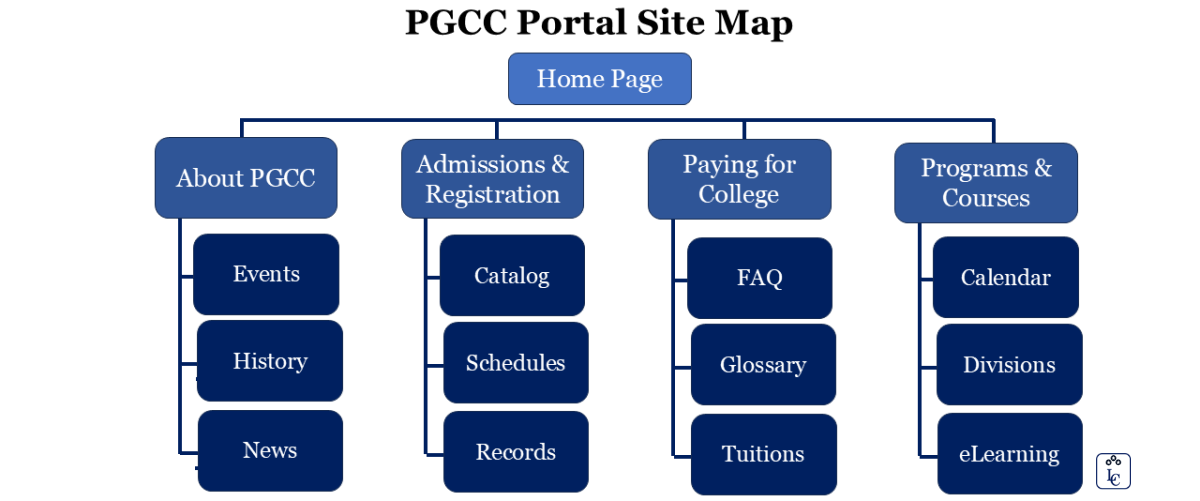
| PGCC portal Sitemap. Image by Luis R Castellanos, Public domain, own work. |
While a complete sitemap cannot be finished until after your site is ready to be published, we can include sitemaps under development methods because laying out your site’s organization on paper will help with developing your menu system, logically organizing content, and in defining the scope and purpose of your site. The more content or pages you can define at the beginning of the process will reveal information that will help during your design phase.
To create a sitemap, you can start by creating a running list of all the content you wish to have on your site. Anyone involved in the production or validation of content should be in the room! In each of these steps, it is important to identify your stakeholders. As you are creating your running list, it is often helpful to use index cards so you can determine by card color or pile where a particular piece of content should be.
This will help you discover your menu system, as you create names for piles of cards as your menu title. After, as you diagram what cards are with what pile and where that pile is relative to others, your sitemap will begin to take shape.
A website is a collection of webpages that are accessed with a single domain name or URL.
A webpage is a document written in HTML and can be viewed on any web browser.
Robots.txt
Robots are automated scripts typically used to index or take inventory, of the content in a website for use in things like web searching sites or collecting statistics. A robots file is a basic text file kept in the root folder of your website that instructs these robots on what sections or types of content in your site you do or do not want them to index. Legitimate robots will read this file when they first arrive on your site to honor your request.
Keep in mind this is an enforceable act, and malicious or less-than-reputable robots are still perfectly capable of reading through all non-privileged (i.e. no login required) content on your site.
SEO stands for “search engine optimization.” In simple terms, it means the process of improving your site to increase its visibility when people search for products or services related to your business in Google, Bing, and other search engines. The better visibility your pages have in search results, the more likely you are to garner attention and attract prospective and existing customers to your business.
Search engines such as Google and Bing use bots to crawl pages on the web, going from site to site, collecting information about those pages and putting them in an index.
Wireframes
Wireframes in the web development world are not exactly their literal three-dimensional counterparts in the real world, but they bear a similar purpose. A wireframe may include things like location and size of elements such as a login button, where banners and content sections will sit, and provide an overall idea of how a site will operate. When wireframing a website, the idea is to create a mockup of one or more designs that portray how the interface might appear to the user.
By the end of your wireframing process, you should have an idea of how the site will operate, and have resolved questions over where users will find particular features and elements. Wireframes typically do not include color, actual content, or advanced design decisions like typography. Some of these considerations will have been at least partly addressed when creating your sitemap, and the rest will come once we begin storyboarding.

| PGCC Home page wireframe. Image by Luis R Castellanos, Public domain, own work. |
Storyboarding
Storyboarding a website is quite similar to storyboarding a TV show, comic, or other forms of media. Using our wireframes, we can begin to add color, font, and rough images to our documents. Keep in mind at this point we are probably still in a graphics editor or document style program like PowerPoint, Photoshop, etc. Real code is coming soon, but we can do more mock-ups faster without taking the time to make it function.
As you storyboard, you will create separate pages, or panels, for the screen a user would see as they complete the most important processes on your site. If you are selling something, for example, your storyboard may include examples of product pages, adding items to their cart, logging in, and completing their purchase.
By paging through these panels, you can see how the user experience will progress and identify potential problems like a confusing check out process, or you may discover that your shopping cart block from wireframing may be better off in a different, more predominant location. This process may be repeated several times until a final version is accepted by everyone in the decision process.

| PGCC Home page storyboard. Image by Luis R Castellanos, Public domain, own work. |
Color Schemes
The process of determining the color(s) involved in your site could fill a book.
In fact, it does.
Regardless of the varying opinions of what emotions colors instill, or represent, the quickest way to alienate a user is to give them a visual experience that is unappealing. The layout, appearance, and cohesiveness of your site are something that is immediately judged when a user first visits.

| Color schemes combinations. Image by Luis R Castellanos, Public domain, own work. |
These elements influence everything from their impression of what the site represents, its reputability, and even its trustworthiness as an ecommerce option. If your site appears to be disorganized, dated and out of style, or seems too “busy” or complicated, you can lose users in less than ten seconds.
You can address this issue (even without an artistic eye) by following the techniques we discussed earlier to plan out a simple, intuitive interface, and by using tools to help you select and compare color schemes like “Paletton” or “Colors on the Web”.
Whether you choose to study other books on the subject or not, a great way to keep current is to get ideas from what others are doing by following sites that list or rate sites by appearances such as the annual “Times” review and “The Best Designs” (web page not updated anymore).
| Paletton | Colors on the Web |
9.1.3. Development
File Organization
As more and more files are created to complete the website, keeping everything in one folder will quickly grow cluttered. To address this, sub- folders can be created just like when files are sorted in "My Documents".
Traditionally folders can be created for images, scripts, pages or files, or for different sections of content or tasks. How and why these folders are created varies to personal taste or group determinations, and in some cases it may be done to maintain a particular method of writing code, such as model-view-controller.
It is highly recommended, that if the project will be stored in a device, it will be stored in a proper sub-folder, with all the files, images and documents.
Pseudo-Code First!
Whiteboards, notepads, and napkins can be used to write down some pseudo-code, before the real coding begins. Writing out the plan to tackle a particular problem will help to identify logic problems before the coding begins, and will help to keep track of what is needed to work on as the project progresses.
Algorithm is a set of well-defined instructions to solve a particular problem. It takes a set of input and produces a desired output.
Creating pseudo-code is the process of writing out in loosely structured sentences what needs to be done.
Pseudocode is a technique used to describe the distinct steps of an algorithm in a manner that is easy to understand for anyone with basic programming knowledge.
Benefits of Pseudocode
- Improves Readability: Written in plain, everyday language, it lets anyone understand the logic quickly without needing to know a specific programming language
- Easier collaboration: It provides a common denominator. A Python developer and a C++ developer can easily read and discuss the same pseudocode block.
- Simplifies complex ideas: Pseudocode breaks down massive algorithms into bite-sized, logical steps.
- Focuses on logic: By stripping away syntax errors (like missing curly braces), programmers can focus purely on "Does this logic actually solve the problem?".
Examples of Algorithm and Pseudocode
| Algorithm | Pseudocode |
|
An Algorithm to add two numbers:
|
A Pseudocode to add two numbers:
|
|
An Algorithm to calculate how much to pay for some bananas at a supermarket:
|
A Pseudocode to calculate how much to pay for some bananas at a supermarket:
|
| Check Pseudocode commands in Pseudocode Editor | |
Brackets
Some languages require the programmer to use a combination of parenthesis and brackets to identify what pieces of code belong together. This allows the engine or compiler to delineate between the code that should be tested as a logic statement, code that gets executed if that statement is true, and code that belongs to functions or classes.
Angle brackets (< and >) are the primary brackets used in HTML to enclose elements and create tags.
HTML tags come in pairs consisting of an opening tag and a closing tag to wrap around text or other elements.
- Opening Tag: Uses a less-than sign (<) and a greater-than sign (>) to enclose the tag name, like <body>.
- Closing Tag: Includes a forward slash (/) right after the opening angle bracket to tell the browser the element has ended, like </body>.
As the code is written, it is a good practice to immediately enter both the starting and ending marker first, then create space between them to enter the code. This will help ensure that the opening bracket will have its closing bracket when nesting the code.
Depending on the text editor, it may assist in the coding by automatically adding closing brackets and helping identify which opening and closing brackets go together.
Comments
In HTML, comments are used to add explanatory notes, reminders, and organization to the source code while keeping those notes invisible to the people visiting the website. When a web browser reads the HTML file, it completely ignores anything placed inside a comment tag.
In HTML, comments are written by placing your text between <!-- and -->.
It is natural to feel that we will remember the programming logic as they are so obvious when the code is been created. The need for good commenting becomes immediately apparent when reviewing someone else’s work, and we may be wallowing in frustration trying to figure out what the other person was trying to do.
Any code of your own that you haven’t looked at for six or more months, might as well have been written by someone else.
— Peter S Eagleson, MIT
This is not meant to endorse comments that are obvious to the reader from the line, like:
| $int = 2 + 2 <!-- we added 2 and 2 together --> |
Rather, comments are best suited to explaining why agreed upon methods were not used or what difficult to understand code might be doing, like:
| <!-- This block of code checks each text file in the folder for the given date and deletes it --> |
Spacing
Just as spacing is used in documents to convey that a topic change is occurring, it can break up a longer string of commands by putting spaces around lines that are grouped together to complete a particular task, signifying that the next set of lines is for another task.
Indentation
To make the code easier to read, indentation can be used to give the reader an idea of what lines of code belong to different sections. This is typically done inside functions, classes, and control structures. When the code is nested, extra indentations are added for each layer within, moving those blocks of text further right to visually distinguish.
As the contents of a loop or function ends, the closing bracket is lined up with the function definition or logic statement to show that the section of code belonging to it, is complete.
While the program will run just fine without indentation (and without spacing), it makes it easier for humans to read and understand the program and its logic.
Meaningful Variable Names
When variables and functions are created, their assigned names should have meaning, not only for the coder, but also to others who may read the code. While it can be tempting to use a lot of short variable names while writing the code, it will be more difficult later to follow what the variable is supposed to represent.
Short names, like queryResult or query_result can be used, or something longer like numberOfResumesReceived.
While the latter takes longer to type while coding, the name is very clear on what it represents. As spaces are generally prohibited in variable names, these examples show us a few ways to approach longer names.
The method used depends on the coder, but it should be used consistently throughout all the code to reduce confusion. Differences in how and where capitalization or underscores are used, can represent different types of variables, like classes or groups of variables.
Short variable names like a simple x or generic name like temp may have their places in the code, but are best reserved for when they identify a small variable or one which will have a very short shelf life in the code.
Camel case (sometimes stylized autologically as camelCase or CamelCase, also known as camel caps or more formally as medial capitals) is the practice of writing phrases without spaces or punctuation and with capitalized words.
It has been one of the best practices in coding, to use camel case when naming variables and functions.
|
DateOfBirth, OldAddress, EmployeeFirstName, TotalVolume, StudentZipCode, ClientID. |
Versioning
This is the process of creating multiple versions of the software, instead of continuously overwriting the sole edition of the code. By creating different copies of the program as new features are added or created, can preserve working copies or even create different versions of the program.
This allows to “roll back” or restore previous versions if unforeseen errors are created in the new code, or to allow different features to be tried and discarded over time.
Naming conventions for different versions of the code might involve numbers, letters, release stages (i.e. alpha, beta, release candidate, and release), a combination of all of these, or just “development” and “live.”
Templates
Similar to the idea behind frameworks, templates are sets of files that dictate the basic structure that provides a layout to the web page. Templates typically create a grid format that can be selected from, like two or three columns, fixed or relative width and height, etc.
An HTML template is a pre-written, downloadable file (or package of files) containing structured HTML code, CSS stylesheets, and images.
Templates are useful for getting the look and feel of a site up and running fast and there is little concern about the particulars of appearance, or whenever the template meets the needs well. When inserting the content dynamically, multiple templates can be used for one site to change the look and feel quickly based on which one is applied. This might be determined by what type of device the visitor is using, or what type of authentication they are using. Templates can be both freestanding or can be an extension of a content management system or framework.
A Content Management System (CMS) is a software application that allows you to create, manage, and publish digital content for websites and apps without the requirement of coding knowledge.
| Some of the most popular CMS platforms for beginners are: | ||||
| Wix | Wordpress | Squarespace | Shopify | Joomla |

| HTML coder. Image by Earvine95 from Pixabay. |
9.1.4. IDE
An integrated development environment (IDE) is a software application that helps programmers develop software code efficiently.
Instead of using a basic text editor and running separate tools for compiling or previewing, an IDE combines key features into a single application:
-
Source Code Editor: Provides syntax highlighting, auto-completion, and tag matching.
-
Build Automation & Execution: Tools to preview, run, or build projects quickly.
-
Debugger: Helps identify and fix errors in code.
-
Project Management: Organizes files, assets, and directories within a workspace.
IDEs for HTML
While pure HTML doesn't require a heavy IDE (since it's a markup language rather than a compiled programming language), developers typically use feature-rich code editors or specialized web IDEs that support HTML along with CSS and JavaScript.
HTML source code can be written with any text editor. The IDE provides and editor that allows syntax highlighting and a template library, among other things, that makes it easier to code.
1. Visual Studio Code (VS Code)
- Type: Source Code Editor / Lightweight IDE
- Cost: Free (Open-source)
- Platforms: Windows, macOS, Linux
- Highlights: The industry standard for web development. It features Emmet integration (shortcodes for quick HTML generation), Live Server (instant browser previews on save), and thousands of extensions.
| Visual Studio Code |
2. WebStorm
- Type: Full-featured Web IDE
- Cost: Paid (Subscription; free for students/educators)
- Platforms: Windows, macOS, Linux
- Highlights: Built specifically for JavaScript and web technologies by JetBrains. It provides out-of-the-box smart code completion, refactoring, and deep framework integration without requiring extra plugins.
| WebStorm |
3. Sublime Text
- Type: Lightweight Code Editor
- Cost: Free evaluation / Paid license
- Platforms: Windows, macOS, Linux
- Highlights: Ultra-fast startup time and smooth performance. Excellent for quick HTML edits with strong syntax highlighting and customizable keyboard shortcuts.
| Sublime Text |
4. Adobe Dreamweaver
- Type: WYSIWYG Editor / Visual IDE
- Cost: Paid (Adobe Creative Cloud)
- Platforms: Windows, macOS
- Highlights: Combines a visual design interface (drag-and-drop / live visual preview) with a code editor. Popular for visual designers who want to see layout changes immediately alongside source code.
| Adobe Dreamweaver |
5. CodePen / Replit (Browser-Based Web IDEs)
- Type: Cloud IDEs
- Cost: Free with premium tiers
- Platforms: Web Browser
- Highlights: Require zero installation. They allow you to write HTML, CSS, and JS side-by-side with an instant live preview, making them ideal for quick testing, sharing code snippets, or learning.
| CodePen | Replit |

AWS. What is an IDE (Integrated Development Environment)? nd. Link.
PGCC. INT1010: Concepts in Computing. LibreTexts. 2021. Link.
PseudoEditor. What is Pseudocode? nd. Link.
| Banner image by Padrinan from Pixabay. |
This page titled 9.1: An Introduction was last modified on Mon, 21 Sep 2026 15:42:27 GMT and is shared under a CC BY-NC-SA 4.0 license and was authored, remixed, and/or curated by Luis Castellanos Hurtado.
The book could not be loaded just now.