Opening the book…

The second component of an information system is software.
Software is the means to take a user’s data and process it to perform its intended action. Software translates what users want to do into a set of instructions that tell the hardware what to do.
A set of instructions is also called a computer program.
For example, when a user presses the letter ‘A” key on the keyboard when using a word processing app, it is the word processing software that tells the hardware that the user pressed the key ‘A’ on the keyboard and fetches the image of the letter A to display on the screen as feedback to the user that the user’s data is received correctly.
Software is created through the process of programming. We will cover the creation of software in this chapter. In essence, hardware is the machine, and software is the intelligence that tells the hardware what to do. Without software, the hardware would not be functional.
4.1.1. Types of Software
The software component can be broadly divided into two categories: system software and application software.
System software is a collection of computer programs that provide a software platform for other software programs. It also insulates the hardware's specifics from the applications and users as much as possible by managing the hardware and the networks. It consists of:
- Operating System
- Utilities
Application software is a computer program that delivers a specific activity for the users (i.e., create a document, draw a picture). It can be for either
- a general-purpose (i.e., Microsoft Word, Google doc) or
- for a particular purpose (i.e., weather forecast, CAD engineering)
| Software categories | |
| System software | Application software |
|
|

| Overview of software types. Image by Ly-Huong Pham is licensed under CC BY-NC |
4.1.2. System Software
Operating Systems
The operating system provides several essential functions, including:
- Managing the hardware resources of the computer
- Providing the user-interface components
- Providing a platform for software developers to write applications.
All computing devices run an operating system (OS), a key component of the system software.
An Operating System is a set of programs that coordinate hardware components and other programs and acts as an interface with application software and networks.
Early personal-computer operating systems were simple by today’s standards; they did not provide multitasking and required the user to type commands to initiate an action. The amount of memory that early operating systems could handle was limited as well, making large programs impractical to run. The most popular of the early operating systems was IBM’s Disk Operating System, or DOS, which was actually developed for them by Microsoft.
For personal computers, some of the most popular operating systems today are Microsoft’s Windows, Apple’s macOS, Google Chrome OS, and different versions of Linux.
For tablets and smartphones, some of the most popular operating systems are Android and iOS.
Operating Systems will be covered in more detail in the following Section 4.2.
Utility
Utility software includes software that is specific-purposed and focused on keeping the infrastructure healthy.
Examples include antivirus software to scan and stop computer viruses and disk desegmentation software to optimize files' storage.
Over time, some of the popular utilities were absorbed as features of an operating system, so in most cases there is no need to buy additional software.
4.1.3. Application Software
The second major category of software is application software.
While system software focuses on running the computers, application software allows the end-user to accomplish some goals or purposes. Examples include word processing, photo editor, spreadsheet, or a browser.
Applications software are grouped in many categories, including:
- Killer app
- Productivity
- Enterprise
- Mobile
The “Killer” App
When a new type of digital device is invented, there are generally a small group of technology enthusiasts who will purchase it just for the joy of figuring out how it works. A “killer” application runs only on one OS platform and becomes so essential that many people will buy a device on that OS platform just to run that application. For the personal computer, the killer application was the spreadsheet.
In 1979, VisiCalc, the first personal-computer spreadsheet package, was introduced. It was an immediate hit and drove sales of the Apple II. It also solidified the value of the personal computer beyond the relatively small circle of technology geeks. When the IBM PC was released, another spreadsheet program, Lotus 1-2-3, was the killer app for business users. Today, Microsoft Excel dominates as the spreadsheet program, running on all the popular operating systems.
 |
 |
 |
| Visicalc. Gortu, Public domain, Wikimedia Commons | Lotus 1-2-3 logo. Darklanlan, Public Domain, Wikimedia Commons | MS Excel logo. Microsoft, Public Domain, Wikimedia Commons |


More recently, if you wanted to play "Mario Bros", you would have to buy a Nintendo console. And people bought Nintendo, in some cases, just to play "Mario Bros".
Similar thing happened with the "Kindle Fire", by Amazon. If you wanted to read an eBook (ePub format), you needed to have a "Kindle Fire".
Productivity Software
Along with the spreadsheet, several other software applications have become standard tools for the workplace. These applications, called productivity software, allow office employees to complete their daily work. Many times, these applications come packaged together, such as in Microsoft’s Office suite. Here is a list of these applications and their basic functions:
- Word processing: This class of software provides for the creation of written documents. Functions include the ability to type and edit text, format fonts and paragraphs, and add, move, and delete text throughout the document. Most modern word-processing programs also have the ability to add tables, images, voice, videos, and various layout and formatting features to the document. Word processors save their documents as electronic files in a variety of formats. The most popular word-processing package is Microsoft Word, which saves its files in the .docx format. This format can be read/written by many other word-processor packages or converted to other formats such as Adobe’s PDF.
- Spreadsheet: This class of software provides a way to do numeric calculations and analysis. The working area is divided into rows and columns, where users can enter numbers, text, or formulas. The formulas make a spreadsheet powerful, allowing the user to develop complex calculations that can change based on the numbers entered. Most spreadsheets also include the ability to create charts based on the data entered. The most popular spreadsheet package is Microsoft Excel, which saves its files in the .xlsx format. Just as with word processors, many other spreadsheet packages can read and write to this file format.
- Presentation: This software class provides for the creation of slideshow presentations that can be shared, printed, or projected on a screen. Users can add text, images, audio, video, and other media elements to the slides. Microsoft’s PowerPoint remains the most popular software, saving its files in .pptx format.
- Office Suite: Microsoft popularized the idea of the office-software productivity bundle with their release of Microsoft Office. Some office suites include other types of software. For example, Microsoft Office includes Outlook, its e-mail package, and OneNote, an information-gathering collaboration tool. The professional version of Office also includes Microsoft Access, a database package. (Databases are covered more in chapter 7.) This package continues to dominate the market, and most businesses expect employees to know how to use this software. However, many competitors to Microsoft Office exist and are compatible with Microsoft's file formats (see table below). Microsoft now has a cloud-based version called Microsoft Office 365. Similar to Google Drive, this suite allows users to edit and share documents online utilizing cloud-computing technology.
| Suite | Word Processor | Spreadsheet | Presentation |
| MS Office | Word | Excel | Powerpoint |
| Apple iWorks | Pages | Numbers | Keynote |
| Apache OpenOffice | Writer | Calc | Impress |
| Google Drive | Docs | Sheets | Slides |
As presentation software, specifically Microsoft PowerPoint, has gained acceptance as the primary method to formally present information in a business setting, the art of giving an engaging presentation is becoming rare. Many presenters now just read the bullet points in the presentation and immediately bore those in attendance who can already read it for themselves.
The real problem is not with PowerPoint as much as it is with the person creating and presenting. The book "Presentation Zen" by Garr Reynolds (Link) is highly recommended to anyone who wants to improve their presentation skills.
New opportunities have been presented to make presentation software more effective. One such example is Prezi. Prezi is a presentation tool that uses a single canvas for the presentation, allowing presenters to place text, images, and other media on the canvas and then navigate between these objects as they present.
Enterprise Software
As the personal computer proliferated inside organizations, control over the information generated by the organization began splintering. For example, the customer service department creates a customer database to track calls and problem reports. The sales department also creates a database to keep track of customer information. Which one should be used as the master list of customers? As another example, someone in sales might create a spreadsheet to calculate sales revenue, while someone in finance creates a different one that meets their department's needs. However, the two spreadsheets will likely come up with different totals for revenue. Which one is correct? And who is managing all this information? This type of example presents challenges to management to make effective decisions.
Enterprise Resource Planning
In the 1990s, the need to bring the organization’s information back under centralized control became more apparent. The enterprise resource planning (ERP) system (sometimes just called enterprise software) was developed to bring together an entire organization in one software application. Key characteristics of an ERP include:
- An integrated set of modules: Each module serves different functions in an organization, such as Marketing, Sales, Manufacturing.
- A consistent user interface: An ERP is a software application that provides a common interface across all modules of the ERP and is used by an organization’s employees to access information
- A common database: All users of the ERP edit and save their information from the data source. This means that there is only one customer database, there is only one calculation for revenue, etc.
- Integrated business processes: All users must follow the same business rules and process throughout the entire organization”: ERP systems include functionality that covers all of the essential components of a business, such as how organizations track cash, invoices, purchases, payroll, product development, supply chain.

| ERP Modules. Shing Hin Yeung, CC BY-SA 3.0, Wikimedia Commons |

ERP systems were originally marketed to large corporations, given that they are costly. However, as more and more large companies began installing them, ERP vendors began targeting mid-sized and even smaller businesses. Some of the more well-known ERP systems include those from SAP, Oracle, and Microsoft.
To effectively implement an ERP system in an organization, the organization must be ready to make a full commitment, including the cost to train employees as part of the implementation.
All aspects of the organization are affected as old systems are replaced by the ERP system. In general, implementing an ERP system can take two to three years and several million dollars.
So why implement an ERP system? If done properly, an ERP system can bring an organization a good return on its investment. By consolidating information systems across the enterprise and using the software to enforce best practices, most organizations see an overall improvement after implementing an ERP.
Some of the most used ERP solutions are: SAP S/4, Oracle Netsuite, Microsoft Dynamics 365, Workday ERP.
Customer Relationship Management
A customer relationship management (CRM) system is a software application designed to manage customer interactions, including customer service, marketing, and sales. It collects all data about the customers. The objectives of a CRM are:
- Personalize customer relationship to increase customer loyalty
- Improve communication
- Anticipate needs to retain existing or acquire new customers
Some ERP software systems include CRM modules.

| CRM components. Bgrigorov, CC BY-SA 4.0, Wikimedia Commons |

Some of the most used CRM solutions are: Salesforce, Hubspot, Fresworks, Pipedrive.
Supply Chain Management
Many organizations must deal with the complex task of managing their supply chains. At its simplest, a supply chain is a linkage between an organization’s suppliers, its manufacturing facilities, and its products' distributors. Each link in the chain has a multiplying effect on the complexity of the process.
Walmart has more than 100,000 suppliers worldwide, with more than 10,600 stores.
TJ Maxx manages over 21,000 suppliers from more than 100 countries, with more than 1,300 stores.
For example, if there are two suppliers, one manufacturing facility, and two distributors, then there are 2 x 1 x 2 = 4 links to handle. However, if you add two more suppliers, another manufacturing facility, and two more distributors, then you have 4 x 2 x 4 = 32 links to manage.

|
Supply and demand network. Andreas Wieland, CC BY-SA 3.0, Wikimedia Commons |

A supply chain management (SCM) system manages the interconnection between these links and the products' inventory in their various development stages. The Association provides a full definition of a supply chain management system for Operations Management: “The design, planning, execution, control, and monitoring of supply chain activities to create net value, building a competitive infrastructure, leveraging worldwide logistics, synchronizing supply with demand, and measuring performance globally.” 2 Most ERP systems include a supply chain management module.
Some of the most used SCM solutions are: SAP SCM, CIN7, Tensoft, Shippabo.
Mobile Software
A mobile application, commonly called a mobile app, is a software application programmed to run specifically on a mobile device such as smartphones and tablets.
Smartphones and tablets are becoming a dominant form of computing, with many more smartphones being sold than personal computers.
This means that organizations will have to get smart about developing software on mobile devices to stay relevant.
With the rise of mobile devices' adoption, the number of apps is exploding in the millions (Forbes.com, 2020), and there is an app for just about anything a user is looking to do. Examples include apps as a flashlight, a step counter, a plant identifier, and games.
Current uses of apps include personal banking, ride share request, online buying, and many others processes. It is very important that apps be downloaded from trusted places, like the different app stores available.
| Most popular trusted app stores | |||
 |
 |
 |
 |
| Google Play, Public domain, Wikimedia Commons | Apple Inc., Public domain, Wikimedia Commons | Kontakte, MIT, Wikimedia Commons | Microsoft, Public domain, Wikimedia Commons |


4.1.4. Software Creation
We just discussed different types of software and now can ask: How is software created?
If the software is the set of instructions that tells the hardware what to do, how are these instructions written? If a computer reads everything as one and zero, do we have to learn how to write software that way?
Thankfully, another software type is written, especially for software developers to write system software and applications - called programming languages. The people who can program are called coders, computer programmers or software developers.
Analogous to a human language, a programming language consists of keywords, comments, symbols, and grammatical rules to construct statements as valid instructions understandable by the computer to perform certain tasks.
Using this language, a programmer writes a program (called the source code). Another software then processes the source code to convert the programming statements to a machine-readable form, the ones, and zeroes necessary to execute the CPU. This conversion process is often known as compiling, and the software is called the compiler.

| Convert a computer program to an executable. Image by Ly-Huong T. Pham, CC-BY-NC. Wikimedia Commons. |
Most of the time, programming is done inside a programming environment; when you purchase a copy of Visual Studio from Microsoft, it provides the developers with an editor to write the source code, a compiler, and help for many of Microsoft’s programming languages.
Examples of well-known programming languages today include Python, Java, PHP, and C's various flavors (Visual C, C++, C#).
Thousands of programming languages have been created since the first programming language in 1883 by a woman named Ada Lovelace. One of the earlier English-like languages called COBOL has been in use since the 1950s to the present time in services that we still use today, such as payroll, reservation systems. The C programming language was introduced in the 1970s and remained a top popular choice. Some new languages such as C#, Swift are gaining momentum as well. Programmers select the best-matched language with the problem to be solved for a particular OS platform. For example, languages such as HTML and JavaScript are used to develop web pages.
It is hard to determine which language is the most popular since it varies. However, according to TIOBE Index, one of the companies that rank the popularity of the programming languages monthly, you can see the monthly ranking of the programming languages according to its popularity.
TIOBE provides an updated (every month) ranking of the most popular programming languages.
One person can write some programs. However, most software programs are written by many developers. For example, it takes hundreds of software engineers to write Microsoft Windows or Excel. To ensure teams can deliver timely and quality software with the least amount of errors, also known as bugs, formal project management methodologies are used.
The expression computer bug originated from Grace Hopper (1946), computer pioneer, because looking for the causes in a computer malfunction, her team found a bug inside.
Some of the most used software development methodologies are: Cascade or classic, Rapid Application Development (RAD), Open-source software development (OSSD), Joint application development (JAD), Software prototyping.
4.1.5. Open-Source vs Closed-Source Software
When the personal computer was first released, computer enthusiasts immediately banded together to build applications and solve problems. These computer enthusiasts were happy to share any programs they built and solutions to problems they found; this collaboration enabled them to innovate more quickly and fix problems.
As software began to become a business, however, this idea of sharing everything fell out of favor for some. When a software program takes hundreds of hours to develop, it is understandable that the programmers do not want to give it away. This led to a new business model of restrictive software licensing, which required payment for software to the owner, a model that is still dominant today. This model is sometimes referred to as closed source, as the source code remains private property and is not made available to others. Microsoft Windows, Excel, Apple iOS are examples of closed source software.
There are many, however, who feel that software should not be restricted. Like those early hobbyists in the 1970s, they feel that innovation and progress can be made much more rapidly if we share what we learn. In the 1990s, with Internet access connecting more and more people, the open-source movement gained steam.
Open-source software is software that has the source code available for anyone to copy and use.
For non-programmers, it won’t be of much use unless the compiled format is also made available for users to use. However, for programmers, the open-source movement has led to developing some of the world's most-used software, including the Firefox browser, the Linux operating system, and the Apache webserver.
Just about every type of commercial product has an open source equivalent. SourceForge.net lists over two hundred and thirty thousand such products! Many of these products come with the installation tools, support utilities, and full documentation that make them difficult to distinguish from traditional commercial efforts (Woods, 2008). In addition to the LAMP products, some major examples include the following:
- Firefox—a Web browser that competes with Internet Explorer
- OpenOffice—a competitor to Microsoft Office
- Gimp—a graphic tool with features found in Photoshop
- Alfresco—collaboration software that competes with Microsoft Sharepoint and EMC’s Documentum
- Marketcetera—an enterprise trading platform for hedge fund managers that competes with FlexTrade and Portware
- Zimbra—open source e-mail software that competes with Outlook server
- MySQL, Ingres, and EnterpriseDB—open source database software packages that each go head-to-head with commercial products from Oracle, Microsoft, Sybase, and IBM
- SugarCRM—customer relationship management software that competes with Salesforce.com and Siebel
- Asterix—an open source implementation for running a PBX corporate telephony system that competes with offerings from Nortel and Cisco, among others
- Free BSD and Sun’s OpenSolaris—open source versions of the Unix operating sys
Some people are concerned that open-source software can be vulnerable to security risks since the source code is available. Others counter that because the source code is freely available, many programmers have contributed to open-source software projects, making the code less buggy and adding features, and fixing bugs much faster than closed-source software.
Many businesses are wary of open-source software precisely because the code is available for anyone to see. They feel that this increases the risk of an attack. Others counter that this openness decreases the risk because the code is exposed to thousands of programmers who can incorporate code changes to patch vulnerabilities quickly.
OSS benefits
In summary, some benefits of the open-source model are:
- The software is available for free: Free alternatives to costly commercial code can be a tremendous motivator, particularly since conventional software often requires customers to pay for every copy used and to pay more for software that runs on increasingly powerful hardware. Big Lots stores lowered costs by as much as $10 million by finding viable OSS (Castelluccio, 2008) to serve their system needs. Online broker E*TRADE estimates that its switch to open source helped save over $13 million a year (King, 2008). And Amazon claimed in SEC filings that the switch to open source was a key contributor to nearly $20 million in tech savings (Shankland, et. al., 2001). Firms like TiVo, which use OSS in their own products, eliminate a cost spent either developing their own operating system or licensing similar software from a vendor like Microsoft.
- Reliability: There’s a saying in the open source community, “Given enough eyeballs, all bugs are shallow” (Raymond, 1999). What this means is that the more people who look at a program’s code, the greater the likelihood that an error will be caught and corrected. The open source community harnesses the power of legions of geeks who are constantly trawling OSS products, looking to squash bugs and improve product quality. And studies have shown that the quality of popular OSS products outperforms proprietary commercial competitors (Ljungberg, 2000). In one study, Carnegie Mellon University’s Cylab estimated the quality of Linux code to be less buggy than commercial alternatives by a factor of two hundred (Castelluccio, 2008)!
- Security: OSS advocates also argue that by allowing “many eyes” to examine the code, the security vulnerabilities of open source products come to light more quickly and can be addressed with greater speed and reliability (Wheeler, 2003). High profile hacking contests have frequently demonstrated the strength of OSS products. In one well-publicized 2008 event, laptops running Windows and Macintosh were both hacked (the latter in just two minutes), while a laptop running Linux remained uncompromised (McMillan, 2008). Government agencies and the military often appreciate the opportunity to scrutinize open source efforts to verify system integrity (a particularly sensitive issue among foreign governments leery of legislation like the USA PATRIOT Act of 2001) (Lohr, 2003). Many OSS vendors offer security focused (sometimes called hardened) versions of their products. These can include systems that monitor the integrity of an OSS distribution, checking file size and other indicators to be sure that code has not been modified and redistributed by bad guys who’ve added a back door, malicious routines, or other vulnerabilities.
- Scalability: Many major OSS efforts can run on everything from cheap commodity hardware to high-end supercomputing. Scalability allows a firm to scale from start-up to blue chip without having to significantly rewrite their code, potentially saving big on software development costs. Not only can many forms of OSS be migrated to more powerful hardware, packages like Linux have also been optimized to balance a server’s workload among a large number of machines working in tandem. Brokerage firm E*TRADE claims that usage spikes following 2008 U.S. Federal Reserve moves flooded the firm’s systems, creating the highest utilization levels in five years. But E*TRADE credits its scalable open source systems for maintaining performance while competitors’ systems struggled (King, 2008).
- Agility and Time to Market: Vendors who use OSS as part of product offerings may be able to skip whole segments of the software development process, allowing new products to reach the market faster than if the entire software system had to be developed from scratch, in-house. Motorola has claimed that customizing products built on OSS has helped speed time-to-market for the firm’s mobile phones, while the team behind the Zimbra e-mail and calendar effort built their first product in just a few months by using some forty blocks of free code (Guth, 2006).
- The software source code is available: It can be examined and reviewed before it is installed.
- Quick Updates: The large community of programmers who work on open-source projects leads to quick bug-fixing and feature additions.
Closed source software benefits
Some benefits of the closed-source model are:
- Providing a financial incentive for software developers or companies
- Technical support from the company that developed the software.
Today there are thousands of open-source software applications available for download. An example of open-source productivity software is Open Office Suite.
Why Give It Away? The Business of Open Source
Open source is a sixty-billion-dollar industry (Asay, 2008), but it has a disproportionate impact on the trillion-dollar IT market. By lowering the cost of computing, open source efforts make more computing options accessible to smaller firms. More reliable, secure computing also lowers costs for all users. OSS also diverts funds that firms would otherwise spend on fixed costs, like operating systems and databases, so that these funds can be spent on innovation or other more competitive initiatives. Think about Google, a firm that some estimate has over 1.4 million servers. Imagine the costs if it had to license software for each of those boxes!
Commercial interest in OSS has sparked an acquisition binge. Red Hat bought open source application server firm JBoss for $350 million. Novell snapped up SUSE Linux for $210 million. And Sun plunked down over $1 billion for open source database provider MySQL (Greenberg, 2008). And with Oracle’s acquisition of Sun, one of the world’s largest commercial software firms has zeroed in on one of the deepest portfolios of open source products.
But how do vendors make money on open source?
One way is by selling support and consulting services. While not exactly Microsoft money, Red Hat, the largest purely OSS firm, reported half a billion dollars in revenue in 2008. The firm had two and a half million paid subscriptions offering access to software updates and support services (Greenberg, 2008). Oracle, a firm that sells commercial ERP and database products, provides Linux for free, selling high-margin Linux support contracts for as much as five hundred thousand dollars (Fortt, 2007). The added benefit for Oracle? Weaning customers away from Microsoft—a firm that sells many products that compete head-to-head with Oracle’s offerings. Service also represents the most important part of IBM’s business. The firm now makes more from services than from selling hardware and software (Robertson, 2009). And every dollar saved on buying someone else’s software product means more money IBM customers can spend on IBM computers and services. Sun Microsystems was a leader in OSS, even before the Oracle acquisition bid. The firm has used OSS to drive advanced hardware sales, but the firm also sells proprietary products that augment its open source efforts. These products include special optimization, configuration management, and performance tools that can tweak OSS code to work its best (Preimesberger, 2008).
Here’s where we also can relate the industry’s evolution to what we’ve learned about standards competition in our earlier chapters. In the pre-Linux days, nearly every major hardware manufacturer made its own, incompatible version of the Unix operating system. These fractured, incompatible markets were each so small that they had difficulty attracting third-party vendors to write application software. Now, much to Microsoft’s dismay, all major hardware firms run Linux. That means there’s a large, unified market that attracts software developers who might otherwise write for Windows.
To keep standards unified, several Linux-supporting hardware and software firms also back the Linux Foundation, the nonprofit effort where Linus Torvalds serves as a fellow, helping to oversee Linux’s evolution. Sharing development expenses in OSS has been likened to going in on a pizza together. Everyone wants a pizza with the same ingredients. The pizza doesn’t make you smarter or better. So why not share the cost of a bigger pie instead of buying by the slice (Cohen, 2008)? With OSS, hardware firms spend less money than they would in the brutal, head-to-head competition where each once offered a “me too” operating system that was incompatible with rivals but offered little differentiation. Hardware firms now find their technical talent can be deployed in other value-added services mentioned above: developing commercial software add-ons, offering consulting services, and enhancing hardware offerings.
Red Hat® Inc. began when a small businessman met a geek at a tech conference. Marc Ewing was the geek—hacking, debugging, and spinning his own distribution of Linux® on CDs from his home in Durham, North Carolina.
Bob Young was the businessman—running a computer supply catalog business out of his home in Connecticut. He noticed a growing interest in Linux, so he began to buy Ewing’s CDs. Young sold out of them so many times that he and Ewing joined forces, and Red Hat Software was born in 1995, with Young as CEO.
The name Red Hat came from Ewing’s experience in his college computer lab. He would wear his grandfather’s red Cornell lacrosse cap, and people would say, "If you need help, look for the guy in the red hat."
In 25+ years, Red Hat has grown from a small, home-based business into the world’s leading provider of enterprise open source solutions. Today, more than 90% of Fortune 500 companies rely on Red Hat, and its products and solutions are trusted on a global scale.
Starting with the revolutionary foundation of Red Hat Enterprise Linux, Red Hat has built a broad portfolio spanning a full, modern IT stack, including hybrid cloud infrastructure, middleware, agile integration, cloud-native application development, and management and automation solutions. As always, everything continues to be made the open source way.
| Red Hat products |

| Red Hat logo. Red Hat, Public domain, from Wikimedia Commons |

Linux on the Desktop?
While Linux is a major player in enterprise software, mobile phones, and consumer electronics, the Linux OS can only be found on a tiny fraction of desktop computers. There are several reasons for this. Some suggest Linux simply isn’t as easy to install and use as Windows or the Mac OS. This complexity can raise the total cost of ownership (TCO) of Linux desktops, with additional end-user support offsetting any gains from free software. The small number of desktop users also dissuades third party firms from porting popular desktop applications over to Linux. For consumers in most industrialized nations, the added complexity and limited desktop application availability of desktop Linux just it isn’t worth the one to two hundred dollars saved by giving up Windows.
But in developing nations where incomes are lower, the cost of Windows can be daunting. Consider the OLPC (One Laptop Per Child project), Nicholas Negroponte’s “one-hundred-dollar” laptop. An additional one hundred dollars for Windows would double the target cost for the nonprofit’s machines. It is not surprising that the first OLPC laptops ran Linux. Microsoft recognizes that if a whole generation of first-time computer users grows up without Windows, they may favor open source alternatives years later when starting their own businesses. As a result, Microsoft has begun offering low-cost versions of Windows (in some cases for as little as seven dollars) in nations where populations have much lower incomes. Microsoft has even offered a version of Windows to the backers of the OLPC. While Microsoft won’t make much money on these efforts, the low cost versions will serve to entrench Microsoft products as standards in emerging markets, staving off open source rivals and positioning the firm to raise prices years later when income levels rise.
A popular distribution of Linux is Ubuntu, which can be downloaded and installed in your computer. It is one of the most user-friendly distributions.

| Ubuntu logo. Image by Ubuntu, Public domain, from Wikimedia Commons |

MySQL: Turning a Ten-Billion-Dollars-a-Year Business into a One-Billion-Dollar One
Finland is not the only Scandinavian country to spawn an open source powerhouse. Uppsala Sweden’s MySQL (pronounced “my sequel”) is the “M” in the LAMP stack, and is used by organizations as diverse as FedEx, Lufthansa, NASA, Sony, UPS, and YouTube.
The “SQL” in name stands for the structured query language, a standard method for organizing and accessing data. SQL is also employed by commercial database products from Oracle, Microsoft, and Sybase. Even Linux-loving IBM uses SQL in its own lucrative DB2 commercial database product. Since all of these databases are based on the same standard, switching costs are lower, so migrating from a commercial product to MySQL’s open source alternative is relatively easy. And that spells trouble for commercial firms. Granted, the commercial efforts offer some bells and whistles that MySQL doesn’t yet have, but those extras aren’t necessary in a lot of standard database use. Some organizations, impressed with MySQL’s capabilities, are mandating its use on all new development efforts, attempting to cordon off proprietary products in legacy code that is maintained but not expanded.
Savings from using MySQL can be huge. The Web site PriceGrabber pays less than ten thousand dollars in support for MySQL compared to one hundred thousand to two hundred thousand dollars for a comparable Oracle effort. Lycos Europe switched from Oracle to MySQL and slashed costs from one hundred twenty thousand dollars a year to seven thousand dollars. And the travel reservation firm Sabre used open source products such as MySQL to slash ticket purchase processing costs by 80 percent (Lyons, 2004).
MySQL does make money, just not as much as its commercial rivals. While you can download a version of MySQL over the Net, the flagship product also sells for four hundred ninety-five dollars per server computer compared to a list price for Oracle that can climb as high as one hundred sixty thousand dollars. Of the roughly eleven million copies of MySQL in use, the company only gets paid for about one in a thousand (Ricadela, 2007). Firms pay for what’s free for one of two reasons: (1) for MySQL service, and (2) for the right to incorporate MySQL’s code into their own products (Kirkpatrick, 2004). Amazon, Facebook, Gap, NBC, and Sabre pay MySQL for support; Cisco, Ericsson, HP, and Symantec pay for the rights to the code (Ricadela, 2007). Top-level round-the-clock support for MySQL for up to fifty servers is fifty thousand dollars a year, still a fraction of the cost for commercial alternatives. Founder Marten Mickos has stated an explicit goal of the firm is “turning the $10-billion-a-year database business into a $1 billion one” (Kirkpatrick, 2004).
When Sun Microsystems spent over $1 billion to buy Mickos’ MySQL in 2008, Sun CEO Jonathan Schwartz called the purchase the “most important acquisition in the company’s history” (Shankland, 2008). Sun hoped the cheap database software could make the firm’s hardware offerings seem more attractive. And it looked like Sun was good for MySQL, with the product’s revenues growing 55 percent in the year after the acquisition (Asay, 2009).
But here’s where it gets complicated. Sun also had a lucrative business selling hardware to support commercial ERP and database software from Oracle. That put Sun and partner Oracle in a relationship where they were both competitors and collaborators. Then in spring 2009, Oracle announced it was buying Sun. Oracle CEO Larry Ellison mentioned acquiring the Java language was the crown jewel of the purchase, but industry watchers have raised several questions. Will the firm continue to nurture MySQL and other open source products, even as this software poses a threat to its bread-and-butter database products? Will the development community continue to back MySQL as the de facto standard for open source SQL databases, or will they migrate to an alternative? Or will Oracle find the right mix of free and fee-based products and services that allow MySQL to thrive while Oracle continues to grow? The implications are serious for investors, as well as firms that have made commitments to Sun, Oracle, and MySQL products. The complexity of this environment further demonstrates why technologists need business savvy and market monitoring skills and why business folks need to understand the implications of technology and tech-industry developments.

| MySQL logo. Image by Oracle, Public domain, from Wikimedia Commons |

Legal Risks and Open Source Software: A Hidden and Complex Challenge
Open source software isn’t without its risks. Competing reports cite certain open source products as being difficult to install and maintain (suggesting potentially higher total cost of ownership, or TCO). Adopters of OSS without support contracts may lament having to rely on an uncertain community of volunteers to support their problems and provide innovative upgrades. Another major concern is legal exposure. Firms adopting OSS may be at risk if they distribute code and aren’t aware of the licensing implications. Some commercial software firms have pressed legal action against the users of open source products when there is a perceived violation of software patents or other unauthorized use of their proprietary code.
For example, in 2007 Microsoft suggested that Linux and other open source software efforts violated some two hundred thirty-five of its patents (Ricadela, 2007). The firm then began collecting payments and gaining access to the patent portfolios of companies that use the open source Linux operating system in their products, including Fuji, Samsung, and Xerox. Microsoft also cut a deal with Linux vendor Novell in which both firms pledged not to sue each other’s customers for potential patent infringements.
Also complicating issues are the varying open source license agreements (these go by various names, such as GPL and the Apache License), each with slightly different legal provisions—many of which have evolved over time. Keeping legal with so many licensing standards can be a challenge, especially for firms that want to bundle open source code into their own products (Lacy, 2006). An entire industry has sprouted up to help firms navigate the minefield of open source legal licenses. Chief among these are products, such as those offered by the firm Black Duck, which analyze the composition of software source code and report on any areas of concern so that firms can honor any legal obligations associated with their offerings. Keeping legal requires effort and attention, even in an environment where products are allegedly “free.” This also shows that even corporate lawyers had best geek-up if they want to prove they’re capable of navigating a twenty-first-century legal environment.
Software Licenses
The companies or developers own the software they create. The software is protected by law either through patents, copyright, or licenses. It is up to the software owners to grant their users the right to use the software through the terms of the licenses.
For closed-source vendors, the terms vary depending on the price the users are willing to pay. Examples include single user, single installation, multi-users, multi-installations, per network, or machine.
They have specific permission levels for open-source vendors to grant using the source code and set the modified version conditions. Examples include free to distribute, remix, adapt for non-commercial use but with the condition that the newly revised source code must also be licensed under identical terms. While open-source vendors don’t make money by charging for their software, they generate revenues through donations or selling technical support or related services. For example, Wikipedia is a widely popular and online free-content encyclopedia used by millions of users. Yet, it relies mainly on donations to sustain its staff and infrastructure.
There Are Now 8.9 Million Mobile Apps, And China Is 40% Of Mobile App Spending (2020, Feb 28). Retrieved September 4, 2020, from https://www.forbes.com/
4.1.6. Cloud Computing
Historically, for software to run on a computer, an individual copy of the software had to be installed on the computer, either from a disk or, more recently, after being downloaded from the Internet. The concept of “cloud” computing changes this model.
Cloud computing, or just "the cloud”, refers to applications, services, and data stored in data centers, server farms, and storage servers and accessed by users via the Internet.
In most cases, the users don’t know where their data is actually stored. Individuals and organizations use cloud computing.
You probably already use cloud computing in some forms. For example, if you access your email via your web browser, you are using a form of cloud computing. If you use Google Drive’s applications, you are using cloud computing. Simultaneously, these are free versions of cloud computing, big business in providing applications and data storage over the web. Commercial and large applications can also exist on the cloud, such as the entire suite of CRM from Salesforce is offered via the cloud. Cloud computing is not limited to web applications: it can also be used for phone or video streaming services.

| Cloud computing. Image by Roman from Pixabay |
Advantages of Cloud Computing
- No software to install or upgrades to maintain.
- Available from any computer that has access to the Internet.
- Can scale to a large number of users easily.
- New applications can be up and running very quickly.
- Services can be leased for a limited time on an as-needed basis.
- Your information is not lost if your hard disk crashes or your laptop is stolen.
- You are not limited by the available memory or disk space on your computer.
Disadvantages of Cloud Computing
- You must have Internet access to use it. If you do not have access, you’re out of luck.
- You are relying on a third party to provide these services.
- You don’t know how your data is protected from theft or sold by your own cloud service provider.
Cloud computing can greatly impact how organizations manage technology. For example, why is an IT department needed to purchase, configure, and manage personal computers and software when all that is really needed is an Internet connection?
Using a Private Cloud
Many organizations are understandably nervous about giving up control of their data and applications using cloud computing. But they also see the value in reducing the need for installing software and adding disk storage to local computers. A solution to this problem lies in the concept of a private cloud. While there are various private cloud models, the basic idea is for the cloud service provider to rent a specific portion of their server space exclusive to a specific organization. The organization has full control over that server space while still gaining some of the benefits of cloud computing.
Cloud Emerging Technology/Current Trend
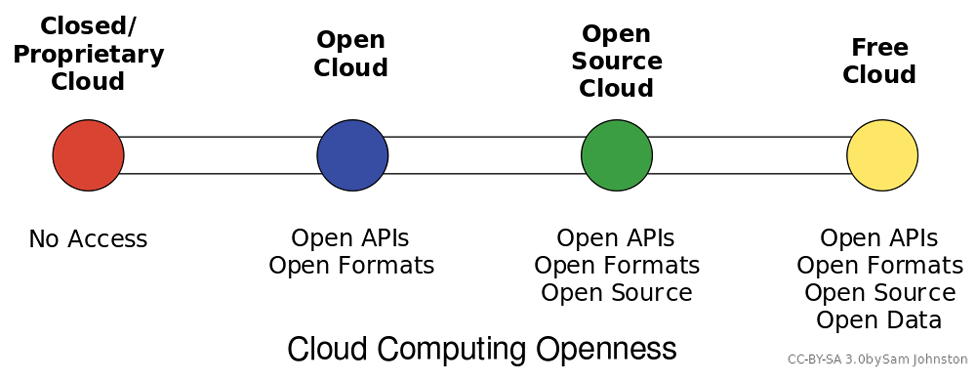
| Cloud Computing Styles. By ObySam Johnson, CC-BY-SA 3. |
Cloud computing can be loosely defined as the allocation of hardware and/or software under a service model (resources are assigned and consumed as needed).
Typically, what we hear today referred to as cloud computing is the concept of business-to-business commerce revolving around “Company A” selling or renting their services to “Company B” over the Internet. A cloud can be public (hosted on a public internet, shared among consumers) or private (cloud concepts of provisioning and storage are applied to servers within a fire wall or internal network that is privately managed), and can also fall into some smaller subsets in between, as depicted in the graphic above.
Under Infrastructure as a Service (IaaS) computing model, which is what is most commonly associated with the term cloud computing, one or more servers with significant amounts of processing power, capacity, and memory, are configured through hardware and/or software methods to act as though they are multiple smaller systems that add up to their capacity. This is referred to as virtualizing, or virtual servers. These systems can be “right sized” where they only consume the resources they need on average, meaning many systems needing little resources can reside on one piece of hardware. When processing demands of one system expand or contract, resources from that server can be added or removed to account for the change. This is an alternative to multiple physical servers, where each would need the ability to serve not only the average but expected peak needs of system resources.
Software as a Service, Platform as a Service, and the ever-expanding list of “as-a-service” models follow the same basic pattern of balancing time and effort. Platforms as a service allow central control of end user profiles, and software as a service allows simplified (and/or automated) updating of programs and configurations. Storage as a service can replace the need to manually process backups and file server maintenance. Effectively, each “as-a-service” strives to provide the end user with an “as-good-if-not-better” alternative to managing a system themselves, all while trying to keep the cost of their services less than a self-managed solution.
The main types of cloud services are:
- Infrastructure as a service (IaaS)
- Provides on-demand access to virtual and physical servers, storage, networking, and other IT infrastructure.
- Platform as a service (PaaS)
- Allows users to create and deploy applications.
- Software as a service (SaaS)
- Provides subscribers with access to software running on a cloud infrastructure. SaaS providers manage the network, servers, storage, and other aspects of the software.

| Comparison of Cloud Computing Models. Rosati, Pierangelo; Lynn, Theo, Public domain, Wikimedia Commons |

Virtualization
The reduced costs and increased power of commodity hardware are not the only contributors to the explosion of cloud computing. The availability of increasingly sophisticated software tools has also had an impact. Perhaps the most important software tool in the cloud computing toolbox is virtualization.
Virtualization is using software to create a virtual machine that simulates a computer with an operating system.
For example, using virtualization, a single computer that runs Microsoft Windows can host a virtual machine that looks like a computer with a specific Linux-based OS. This ability maximizes the use of available resources on a single machine. Companies such as EMC provide virtualization software that allows cloud service providers to provision web servers to their clients quickly and efficiently. Organizations are also implementing virtualization to reduce the number of servers needed to provide the necessary services. For more detail on how virtualization works, see this informational page from VMWare.
Think of virtualization as being a kind of operating system for operating systems. A server running virtualization software can create smaller compartments in memory that each behave as a separate computer with its own operating system and resources. The most sophisticated of these tools also allow firms to combine servers into a huge pool of computing resources that can be allocated as needed (Lyons, 2008).
Virtualization can generate huge savings. Some studies have shown that on average, conventional data centers run at 15 percent or less of their maximum capacity. Data centers using virtualization software have increased utilization to 80 percent or more (Katz, 2009).This increased efficiency means cost savings in hardware, staff, and real estate. Plus it reduces a firm’s IT-based energy consumption, cutting costs, lowering its carbon footprint, and boosting “green cred” (Castro, 2007). Using virtualization, firms can buy and maintain fewer servers, each running at a greater capacity. It can also power down servers until demand increases require them to come online.
While virtualization is a key software building block that makes public cloud computing happen, it can also be used in-house to reduce an organization’s hardware needs, and even to create a firm’s own private cloud of scalable assets. Bechtel, BT, Merrill Lynch, and Morgan Stanley are among the firms with large private clouds enabled by virtualization (Brodkin, 2008). Another kind of virtualization, virtual desktops allow a server to run what amounts to a copy of a PC—OS, applications, and all—and simply deliver an image of what’s executing to a PC or other connected device. This allows firms to scale, back up, secure, and upgrade systems far more easily than if they had to maintain each individual PC. One game start-up hopes to remove the high-powered game console hardware attached to your television and instead put the console in the cloud, delivering games to your TV as they execute remotely on superfast server hardware. Virtualization can even live on your desktop. Anyone who’s ever run Windows in a window on Mac OS X is using virtualization software; these tools inhabit a chunk of your Mac’s memory for running Windows and actually fool this foreign OS into thinking that it’s on a PC.
Interest in virtualization has exploded in recent years. VMware, the virtualization software division of storage firm EMC, was the biggest IPO of 2007. But its niche is getting crowded. Microsoft has entered the market, building virtualization into its server offerings. Dell bought a virtualization software firm for $1.54 billion. And there’s even an open source virtualization product called Xen (Castro, 2007).
Virtualization Emerging Technology/Current Trend
Server virtualization is the act of running multiple operating systems and other software on the same physical hardware at the same time, as we discussed in Cloud Computing. A hardware and/or software element is responsible for managing the physical system resources at a layer in between each of the operating systems and the hardware itself. Doing so allows the consolidation of physical equipment into fewer devices, and is most beneficial when the servers sharing the hardware are unlikely to demand resources at the same time, or when the hardware is powerful enough to serve all of the installations simultaneously.
The act of virtualizing is not just for use in cloud environments, but can be used to decrease the “server sprawl,” or overabundance of physical servers, that can occur when physical hardware is installed on a one-to-one (or few-to-one) scale to applications and sites being served. Special hardware and/or software is used to create a new layer in between the physical resources of your computer and the operating system(s) running on it. This layer manages what each system sees as being the hardware available to it, and manages allocation of resources and the settings for all virtualized systems. Hardware virtualization, or the stand alone approach, sets limits for each operating system and allows them to operate independent of one another. Since hardware virtualization does not require a separate operating system to manage the virtualized system(s), it has the potential to operate faster and consume fewer resources than software virtualization. Software virtualization, or the host-guest approach, requires the virtualizing software to run on an operating system already in use, allowing simpler management to occur from the initial operating system and virtualizing program, but can be more demanding on system resources even when the primary operating system is not being used.
Ultimately, you can think of virtualization like juggling. In this analogy, your hands are the servers, and the balls you juggle are your operating systems. The traditional approach of hosting one application on one server is like holding one ball in each hand. If your hands are both “busy” holding a ball, you cannot interact with anything else without putting a ball down. If you juggle them, however, you can “hold” three or more balls at the same time. Each time your hand touches a ball is akin to a virtualized system needing resources, and having those resources allocated by the virtualization layer (the juggler) assigning resources (a hand), and then reallocating for the next system that needs them.


The addition of a virtual machine as shown above allows the hardware or software to see the virtual machine as part of the regular system. The monitor itself divides the resources allocated to it into subsets that act as their own computers.

ASCCC. Information Systems for Business. Libretexts. 2021. Link.
PGCC. INT1010: Concepts in Computing. Libretexts. 2021. Link.
| Image by Kalhh from Pixabay |
This page titled 4.1: Computer Software was last modified on Thu, 01 Oct 2026 19:04:02 GMT and is shared under a CC BY-NC-SA 4.0 license and was authored, remixed, and/or curated by Luis Castellanos Hurtado.
The book could not be loaded just now.