Opening the book…
Our first program made with Pygame is a small program that makes a window that says "Hello World!" appear on the screen. Open a new file editor window by clicking on IDLE’s File menu, then New Window. Type in the following code into IDLE’s file editor and save it as blankpygame.py. Then run the program by pressing F5 or selecting Run > Run Module from the menu at the top of the file editor.
Remember, do not type the numbers or the periods at the beginning of each line (that’s just for reference in this book).
import pygame, sys
from pygame.locals import *

pygame.init()
DISPLAYSURF = pygame.display.set_mode((400, 300))
pygame.display.set_caption('Hello World!')
while True: # main game loop
    for event in pygame.event.get():
        if event.type == QUIT:
            pygame.quit()
            sys.exit()
    pygame.display.update()
When you run this program, a black window like this will appear:
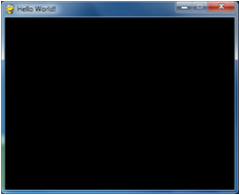
Yay! You’ve just made the world’s most boring video game! It’s just a blank window with "Hello World!" at the top of the window (in what is called the window’s title bar, which holds the caption text). But creating a window is the first step to making graphical games. When you click on the X button in the corner of the window, the program will end and the window will disappear.
Calling the print() function to make text appear in the window won’t work because print() is a function for CLI programs. The same goes for input() to get keyboard input from the user. Pygame uses other functions for input and output which are explained later in this chapter. For now, let’s look at each line in our "Hello World" program in more detail.
This page titled 3.2: Source Code for Hello World with Pygame was last modified on Mon, 18 May 2020 08:29:34 GMT and is shared under a CC BY-NC-SA 3.0 license and was authored, remixed, and/or curated by Al Sweigart via source content that was edited to the style and standards of the LibreTexts platform.
The book could not be loaded just now.