Opening the book…
Anti-aliasing is a graphics technique for making text and shapes look less blocky by adding a little bit of blur to their edges. It takes a little more computation time to draw with anti-aliasing, so although the graphics may look better, your program may run slower (but only just a little).
If you zoom in on an aliased line and an anti-aliased line, they look like this:
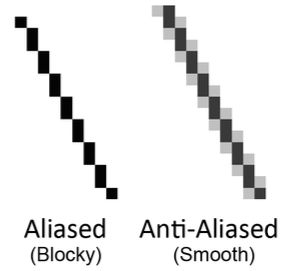
To make Pygame’s text use anti-aliasing, just pass True for the second parameter of the render() method. The pygame.draw.aaline() and pygame.draw.aalines() functions have the same parameters as pygame.draw.line() and pygame.draw.lines(), except they will draw anti-aliased (smooth) lines instead of aliased (blocky) lines.
This page titled 3.21: Anti-Aliasing was last modified on Mon, 18 May 2020 08:29:36 GMT and is shared under a CC BY-NC-SA 3.0 license and was authored, remixed, and/or curated by Al Sweigart via source content that was edited to the style and standards of the LibreTexts platform.
The book could not be loaded just now.