Opening the book…
jsoup makes it easy to download and parse web pages, and to navigate the DOM tree. Here’s an example:
String url = "http://en.Wikipedia.org/wiki/Java_(programming_language)";

// download and parse the document
    Connection conn = Jsoup.connect(url);
    Document doc = conn.get();

    // select the content text and pull out the paragraphs.
    Element content = doc.getElementById("mw-content-text");
    Elements paragraphs = content.select("p");
Jsoup.connect takes a URL as a String and makes a connection to the web server; the get method downloads the HTML, parses it, and returns a Document object, which represents the DOM.
Document provides methods for navigating the tree and selecting nodes. In fact, it provides so many methods, it can be confusing. This example demonstrates two ways to select nodes:
- getElementById takes a String and searches the tree for an element that has a matching “id” field. Here it selects the node
<div lang="en" class="mw-content-ltr">which appears on every Wikipedia page to identify theelement that contains the main text of the page, as opposed to the navigation sidebar and other elements.- The return value from getElementById is an Element object that represents this
and contains the elements in theas children, grandchildren, etc.
- The return value from getElementById is an Element object that represents this
- select takes a String, traverses the tree, and returns all the elements with tags that match the String. In this example, it returns all paragraph tags that appear in content. The return value is an Elements object.
Before you go on, you should skim the documentation of these classes so you know what they can do. The most important classes are Element, Elements, and Node, which you can read about at thinkdast.com/jsoupelt, thinkdast.com/jsoupelts, and thinkdast.com/jsoupnode.
Node represents a node in the DOM tree; there are several subclasses that extend Node, including Element, TextNode, DataNode, and Comment. Elements is a Collection of Element objects.
Figure \(\PageIndex{1}\) is a UML diagram showing the relationships among these classes. In a UML class diagram, a line with a hollow arrow head indicates that one class extends another. For example, this diagram indicates that Elements extends ArrayList. We’ll get back to UML diagrams in Section 11.6.
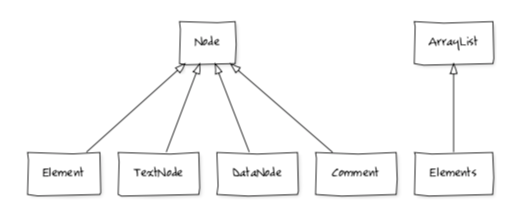
Figure \(\PageIndex{1}\): UML diagram for selected classes provided by jsoup. Edit: http://yuml.me/edit/4bc1c919
This page titled 6.3: Using jsoup was last modified on Tue, 01 Dec 2020 03:50:42 GMT and is shared under a CC BY-NC-SA 3.0 license and was authored, remixed, and/or curated by Allen B. Downey (Green Tea Press) .
The book could not be loaded just now.