Opening the book…
Once a collection of data are stored into an array in a C++ program, there are many things we may need to do with those data. Here we cover some basic tasks.
- Display and calculate the sum of the data that are stored in the array
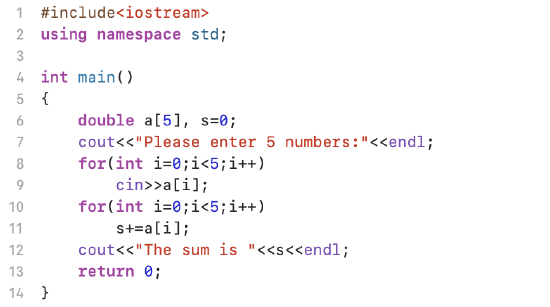
Following is a sample program that asks a user to enter a set of numbers and save them into an array. Then the program
a. displays the data in the array on the screen
b. calculate and display the sum of those data in the array
- Find and Display the Largest Data Stored in the Array
In following sample program, we code a sample array into the program for testing purpose. We use a while loop statement to identify the largest number in the array and then display it on the screen. Please note: We don't alter the data in each element of the array while we are conduct the calculation.

- Negative Number Counts in an Array
In this sample program, we ask a user to enter 20 integers and save them into an integer array. Then the program find the total negative number counts in the array and replace those negative numbers in the array by 0.
Here is the code:

- Formatting The Display of the Data Stored in an Array
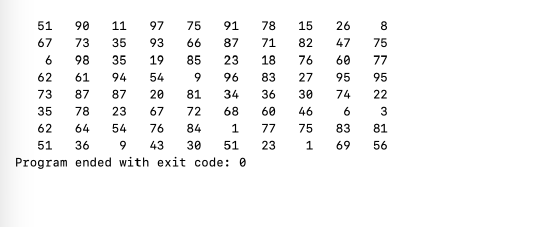
In this program, we use rand() to randomly generate 80 integers from 0 to 99 and store them in an integer array. Then we display those integers in the output screen with 10 integers in a row.
Here is the code:

Line 9 and Line 10: Store 80 random numbers in the array a.
Line 11 - Line 15: Use a for loop to display 80 numbers in the array a. The if statement in Line 12 ensure each time when the value of the looping variable i is a multiple of 10 a new line begins.
The output of the program is
This page titled 7.2: Working with the Data Stored in Arrays was last modified on Wed, 24 Dec 2025 20:37:23 GMT and is shared under a CC BY-NC-SA 4.0 license and was authored, remixed, and/or curated by Jin He.
The book could not be loaded just now.