Opening the book…
Example
Write a program that allow a user to practice on a multiplication problem. The program should meet following requirements:
- Present a multiplication program with two random numbers between 1 and 100
- Ask the user to provide the correct answer
- Check the answer. If the answer is correct, provide the user another question and check the answer and give the feedback. If the answer is incorrect, provide the correct answer.
The output of this program should be (the 1st correct and the 2nd wrong):

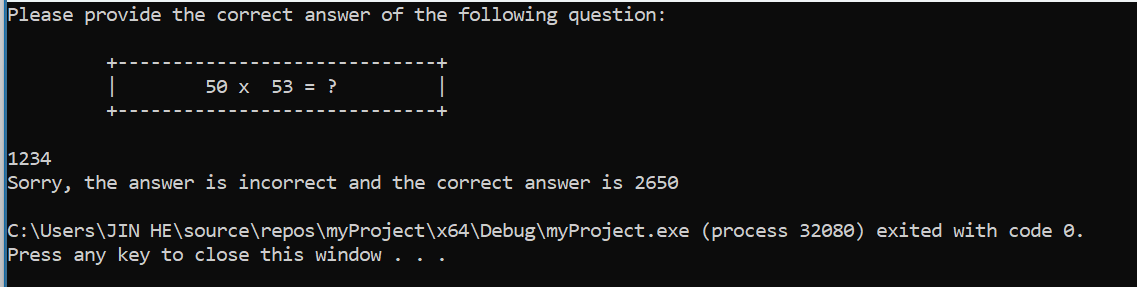
The output of this program should be (the 1st wrong):
The output of the program should be (the 1st correct, and the 2nd correct):

We will be using a random function and a nested if-else statement (an if-else statement inside of an if-else statement). Let's begin.
The first part of this program is codded as following:

Line 7: declares three integer variables
Line 8 - Line 9: use random function to generate two random numbers between 1 and 100 and assign them into variable a and b
Line 10 - Line 15: display the question. Use setw() to correctly align the question and the box
Now, we add the rest of the code of this program as following:

Line 16: a cin statement to take the user input and assign to the variable product
Line 17 - Line 37: It is an if-else statement which checks the user input of the first question
Line 18 - Line 32 (the code inside of red box): This is the body of if, which are code the program will be executing when the value of the relational statement "product==a*b" is true, which means the answer user entered is correct). This block of code provides the feedback (Line 18) and produce another question (Line 19 - Line 26). Inside of this block of the code, we use another if-else statement (Line 28 - Line 33) to check the answer of the second question and provide the feedback. Line 29 will be executed if the user enter the correct answer for the second question and Line 32 will be executed if the answer to the second question is wrong.
Line 36: This is the body of the else of the first if-else statement, which gives the user feed back and provide the correct answer of the first question. Line 36 will only be executed when the relational statement in Line 17 (which means the user did not get the correct answer of the first question)
In this program, we are using an if-else statement inside of the another if-else statement. In an if-else statement, if the body of if or the body of else also contains an if-else statement, we call such statement a nested if-else statement.
This page titled 3.8: Case Study- Practice Multiplication was last modified on Wed, 24 Dec 2025 20:37:21 GMT and is shared under a CC BY-NC-SA 4.0 license and was authored, remixed, and/or curated by Jin He.
The book could not be loaded just now.