Opening the book…
String Variable and C-String
In a C++ program, a string of characters can be stored in either a string variable or in a character array.
To store a string of characters in a string variable or in a c-string (a character array), we can use either an assignment statement in the program or use a cin or getline() statement.
Following is a screen shot of a program. In this program, a string "Homework" is stored in a string variable s in line 7 and in an array of characters a in line 8 respectively. In either case, the string is stored in an array one character per element.
At the end of the array, a special character '\0' is placed into the array to indicating the end of the string.
The program uses a while looping statement to display the characters in each string on the screen with one character per line. We can see that the end of string character, \0, is used for terminating the looping statement.

The output of the program is:

In this program, the strings "Homework" are placed into string variable s and character array a with the code of the program. It is convenient for demonstration or testing purposes. But, if we want to write a program to save a string that is entered by a user, then we will need to revise this program as following:

The statement in Line 10: getline(cin, s) allows a user to input a string into the string variable s. The statement in Line 12: cin.getline(a, 100) allows a user to input a string into the character array a.
Please note: to use a string variable in a program, we need to add a line of code "#include<string>" at the beginning of the source code as we did in above sample program in Line 2.
Example
Write a user-defined function that use a c-string as its input. The function returns the counts of a specified character in the array.
Following is the code of the function along with a main() that shows how the function is used in a C++ program:
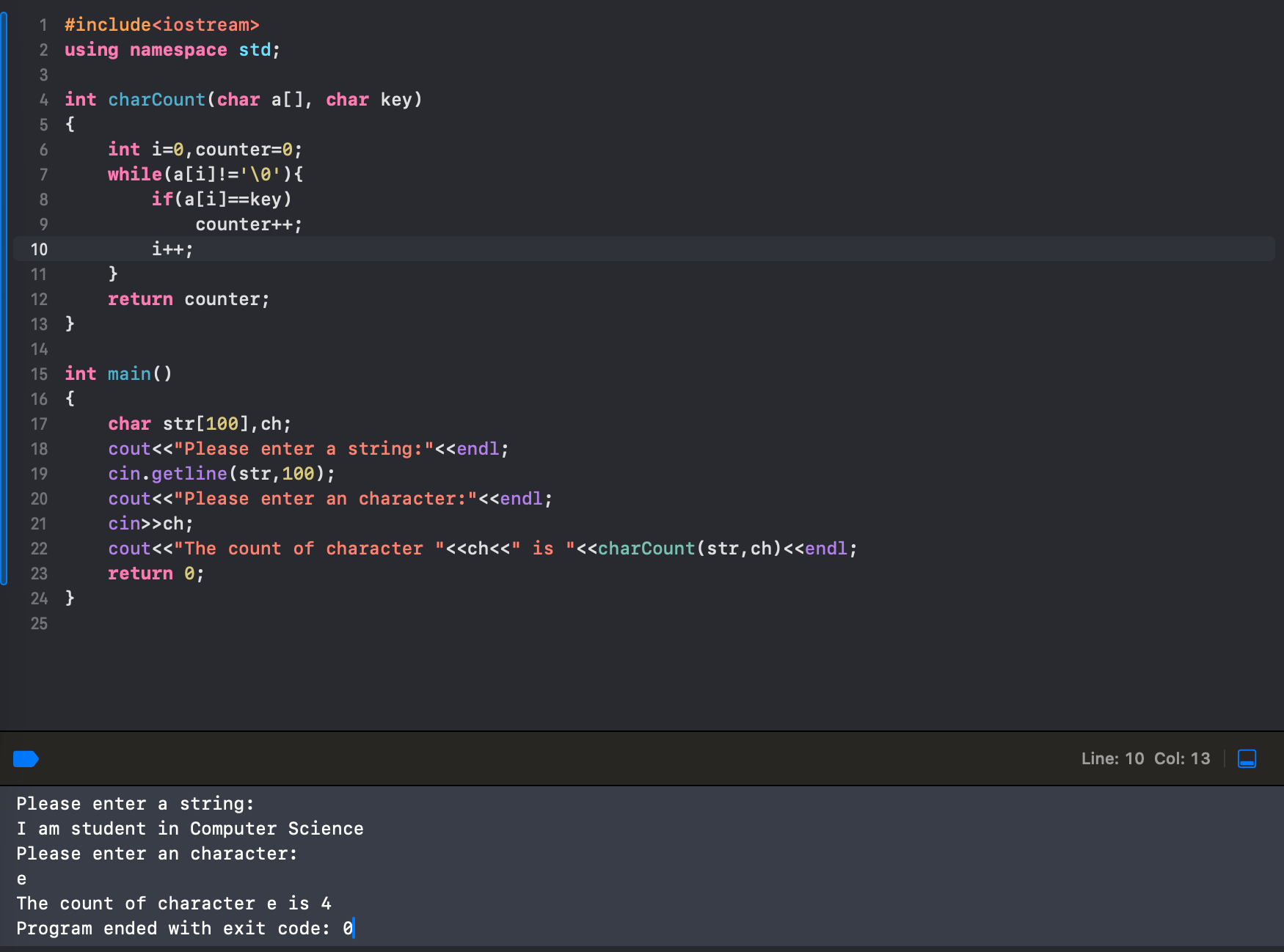
Line 4: Since the function returns the count of the occurrences of a character, the type of the return value of the function should be int. We name the function as. The function needs two inputs: char a[ ] and char key. The first one is a character array and the second one is a single character.
Line 6 - Line 12: The body of the function. It uses a while loop to check each character in the array against the value of the variable key. Increases the value of the variable counter if there is a match. The looping continuation condition a[i]!='\0' ensure the loop stops when all the characters in the array were checked.
Line 22: The function was called with a string stored in the array str and a character stored in the variable ch and the return value of the function was displayed in the output of the program. The string the user entered is "I am s student in Computer Science" and the count of the character 'e' is 4.
This page titled 7.5: C-String and String Variables was last modified on Wed, 24 Dec 2025 20:37:23 GMT and is shared under a CC BY-NC-SA 4.0 license and was authored, remixed, and/or curated by Jin He.
The book could not be loaded just now.