Opening the book…
If you go back to take a look of the C++ programs you have written for this class, you will find the source file of each C++ program contains a single main() function which is in following form:
int main()
{
//The code of your program
}
All the codes you wrote for the program were placed into this function between '{' and '}' Each C++ program's source file will have one and only one such function.
There are also other C++ functions you can use in a C++ program. Those "other" functions are generally classified into two categories.
Preloaded or Build-in Functions
We have used such functions in Study Section 1, such as pow(), which is one of the build-in functions that calculates the power of a number. For example, you may include following line in your program:
cout<<pow(2,5)<<endl;
this statement will calculate the fifth power of 2 which is 32 and displays it on the screen. In this case, 2 and 5 are called the inputs of the function. Each time when you call such function in your program you will need to provide such inputs, and they can be any numbers you choose and function will produce the correct calculation result accordingly.
setw() is another example of build-in functions, which is used in our program for formatting the output of our program. This function also requires an input, which is an integer.
User-Defined Functions
A user-defined function is a function we, as a programmer, will write in our program for certain purpose.
For build-in functions, we don't need to worry about the code of those functions, in other words, we don't need to know how those functions were written and how they were preloaded into the program. All we need to know is the names of those functions and how to use them in our programs. In this study section we will not focus our discussion on those functions, instead, we will learn how to write and use a user-defined functions.
A C++ function, regardless it is a preloaded/build-in function or it is a user-defined function, is a group of statements, commands that perform a certain task with the inputs to produce outputs. In a program, we can repeatedly use those functions as often as needed.
In this section, we will discuss:
- How to name a function
- How to specify the type of function's input and output. The output of a function can be a number, a character, or a string. If the output of a function is a number, a character, or a string, the function must have a so called "return statement" We will discuss it in examples.
- How to write the code for a function so the function will perform the tasks specified.
- How use those functions in our program.
Now, let start with the structure of a C++ Function (Syntax of a C++ function):
Type-of-the-Return-Value nameOfFunciton (Formal Parameters)
{
statement (s);
}
In C++ programming, a function is normally referring to a group of statements, which perform a certain programming tasks, for example, a group of statements that calculates a person's body mass index (BMI).
A C++ function receives its input values through 'Formal Parameters', and use a set of C++ statements to perform certain task. If the task produces a value (it may be a numerical value, character value, Boolean value, or a string value), the function uses a return statement to return such value to the caller of the function. (Here the caller is referring to a statement in main() that contains the name of a function, we will discuss the details of the calling a function.)
Following shows an example of a C++ function:
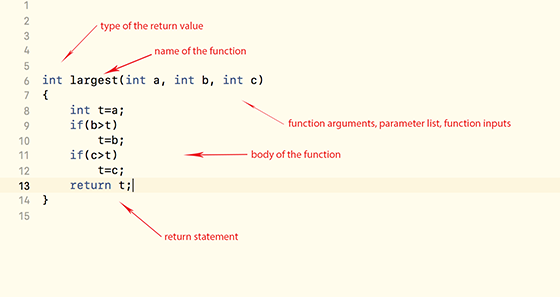
Line 6 is called the header of the function, which specifies the type of the return value of the function, the name of the function, and the formal parameters of the function. This function has three integer parameters, which is for holding the input values of the function.
Line 8 - Line 13: Those statements are called the body of the function. Those statements place the largest input into the variable t and return it.
There are many different ways to place a function in your project. Here, we place this function in the source file of our program as shown down below:

Once we place the function in the source file of the program, we can use such function in our program as following:
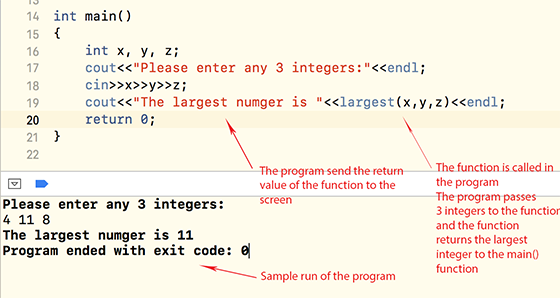
In this example, we can see, a user-defined function is like a self-built programming tool, you can use such tool in our program wherever it is needed, and we can use it in our program as many time as we like, it brings convenience and clarity. Of course, we can put the code of this user-defined function in the main() and still can find the largest number. But, we will have to repeatedly type in those code if we need to perform such task multiple times.
From now on, when we are asked to write a function to perform a certain programming task, we will need to write a separate function which include the name of the function, type of output, type and number of the inputs, which is called the "header of the function". We also need to provide the code for such function so the function will correctly produce (return) the desired output.
Example
Write a function that receives a person's body weight and body height and returns the body mass index (BMI)
We have done this problem before. We used following code (statements) to perform such task:
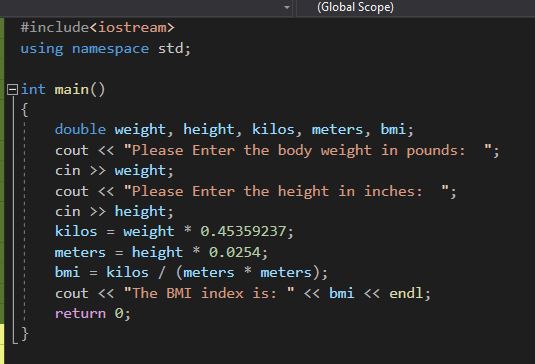
We did this problem by placing all the code directly in the main() function, which was fine and it did the job. Now, we would like to revise this program by using a user-defined function that does the same job.
Step 1: Type the following function structure between the line "using namespace std;" and the line "int main()"
Type-of-the-Return-Value nameOfFunciton (Formal Parameters)
{
}
Step 2: Copy all the statements in the main() function into the function structure as shown below:
Type-of-the-Return-Value nameOfFunciton (Formal Parameters)
{
double weight, height, kilos, meters, bmi;
cout << "Please Enter the body weight in pounds: ";
cin >> weight;
cout << "Please Enter the height in inches: ";
cin >> height;
kilos = weight * 0.45359237;
meters = height * 0.0254;
bmi = kilos / (meters * meters);
cout << "The BMI index is: " << bmi << endl;
return 0;
}
We will need to make some changes, otherwise, it will not be working.
Step 3: Delete those cout and cin statements. This function will not taking the body weight and the body height directly from console. Instead it will take those data through the function's arguments. Delete the variables weight and height as well. Now the function will look like following:
Type-of-the-Return-Value nameOfFunciton (Formal Parameters)
{
double kilos, meters, bmi;
kilos = w * 0.45359237;
meters = h* 0.0254;
bmi = kilos / (meters * meters);
cout << "The BMI index is: " << bmi << endl;
return 0;
}
Step 4: Replace "Type-of-the Return-Value" by "double"; Replace "nameOfFunction" by "BMI"; Replace "Formal Parameters" by "double weight, double height". The function will look like following:
double BMI (double weight, double height)
{
double kilos, meters, bmi;
kilos = w * 0.45359237;
meters = h* 0.0254;
bmi = kilos / (meters * meters);
return 0;
}
here we specify that the number this function produces is a decimal number. We name this function as BMI. We setup two arguments for this function, through those arguments, the function will receives a person's weight and height.
Step 5: Change the last statement in the function from "return 0;" to "return bmi;"
double BMI (double weight, double height)
{
double kilos, meters, bmi;
kilos = w * 0.45359237;
meters = h* 0.0254;
bmi = kilos / (meters * meters);
return bmi;
}
Now, we have completed this function.
We demonstrate how the function is used in the main() for calculating a person's body mass index.
Step 6: Delete all the code in main() and
- Declare two double variables w and h for storing a person's weight and height in Line 16
- Use two pairs of cout and cin statements to ask a user to enter a person's weight and height and save them in the variable w and h in Line 17 - Line 20:

We add two more lines in main() to complete this program:
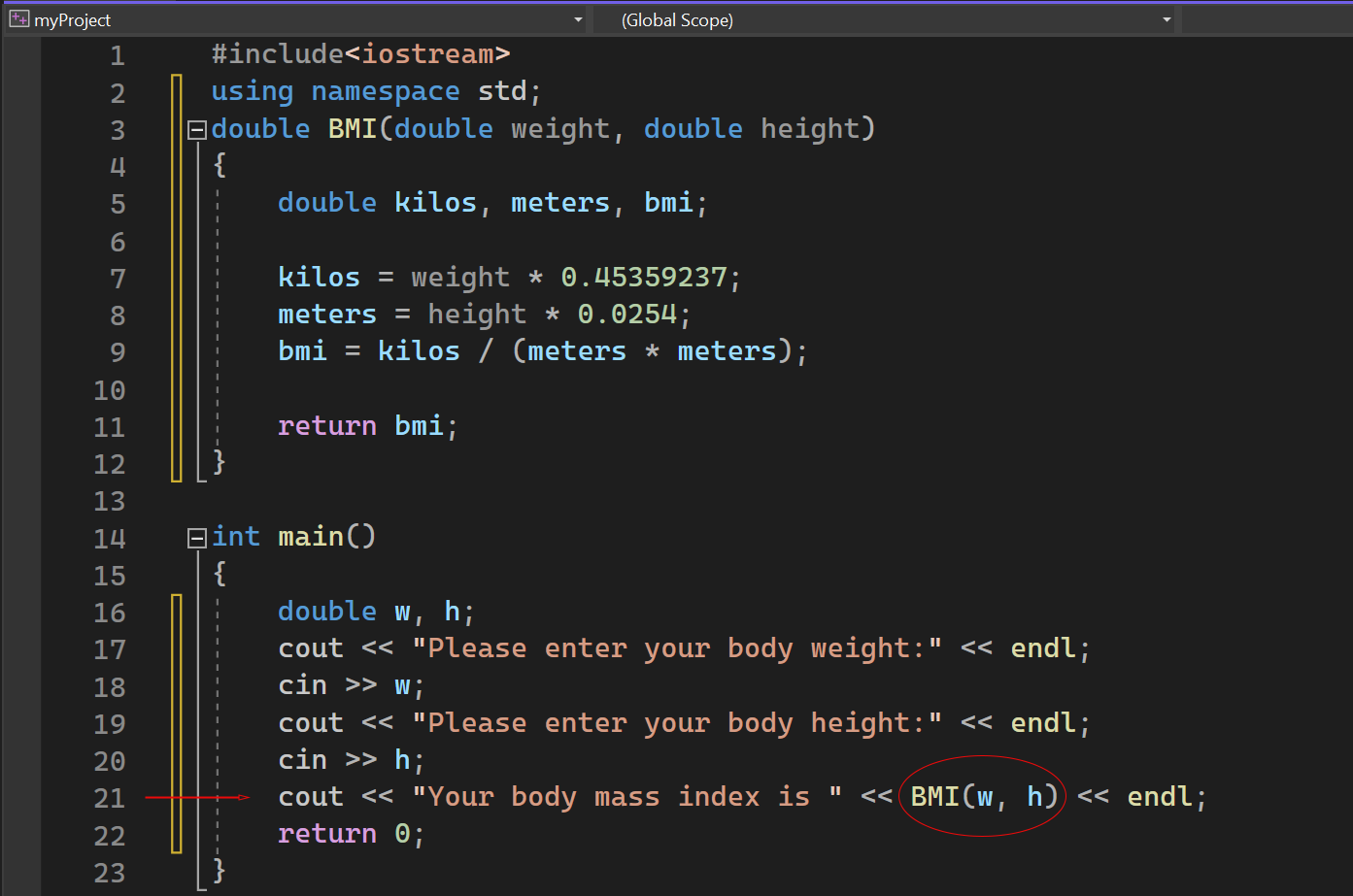
We add a cout statement at line 21. The statement displays the banner "Your body mass index is " followed by the number produced by the return statement inside of the function BMI. BMI(w,h) is the function call. The function receives the body weight and height entered by the user, through the w and h, processes them with the statements we coded into the function, and then produces the result as the output of the function and sends it to main() which is the caller of the function BMI() in this program.
Now, many of you may ask: "Why do we just calculate body mass index in main() as we did before? Why do we have to go through all those troubles to make a user defined function?
First, we hide all the detail code of the calculation from main() to make main() look very clean and neat. Second, we can use BMI() for calculation anywhere we want in main() without re-typing the code. There are many other reasons and benefits of using a user defined function in C++ programming, and we will see them in the future.
This page titled 6.1: Introduction to C++ Functions was last modified on Wed, 24 Dec 2025 20:37:19 GMT and is shared under a CC BY-NC-SA 4.0 license and was authored, remixed, and/or curated by Jin He.
The book could not be loaded just now.