Opening the book…
Effective Identity and Access Management (IAM) is often the first line of defense in cloud security. IAM encompasses the policies, processes, and tools used to manage users’ (and systems’) identities and control their access to resources. In cloud platforms like AWS, Azure, or Google Cloud, IAM is a native service that lets you create identities (users, groups, roles, service accounts) and define fine-grained permissions. A key principle driving IAM design is the principle of least privilege – every user or component should have the minimal set of permissions necessary to perform its function, and no more. By enforcing least privilege, even if credentials are compromised or a user becomes malicious, the potential damage is limited to only those resources that identity was authorized to use.
Cloud project managers should ensure that an IAM strategy is in place from day one. This includes unique user accounts (avoiding shared accounts), strong authentication (password policies and multi-factor authentication), and well-defined group or role-based access controls. Many organizations adopt Role-Based Access Control (RBAC), wherein roles (collections of permissions) are assigned to users according to their job function. For example, a DatabaseAdmin role might allow full control of database instances but no access to application servers, whereas a Developer role might allow deploying code but not altering security settings. Modern IAM systems can also implement Attribute-Based Access Control (ABAC), where access is granted not just by role but by evaluating attributes (e.g., a policy could allow access to records where record.owner == user.department to ensure a user sees only data for their department). This can be important at scale to avoid role explosion by leveraging tags or attributes on resources and identities.
Cloud providers offer robust IAM services: AWS IAM is a global service controlling access to AWS resources, Google Cloud IAM similarly manages roles and permissions for GCP resources, and Azure Active Directory & Role-Based Access Control handle identity in Azure. While the syntax and specifics differ, these IAM systems share common features: they authenticate principals (human users or applications) and then authorize actions based on policies. Authentication can be through usernames/passwords, API keys, or federation (e.g., integration with enterprise identity providers via SAML/OIDC for single sign-on). Authorization policies are typically JSON/YAML documents declaring what actions are “allowed” or “denied” for which identities on which resources. The evaluation logic usually denies by default and only permits an action if a policy explicitly allows it (and no other policy explicitly denies it). One must be careful because a single misconfigured policy could inadvertently grant broad access. Thus, practices like policy version control, code review for privileges, and automated scanning for overly permissive policies (e.g., AWS IAM Access Analyzer or third-party tools) are recommended.

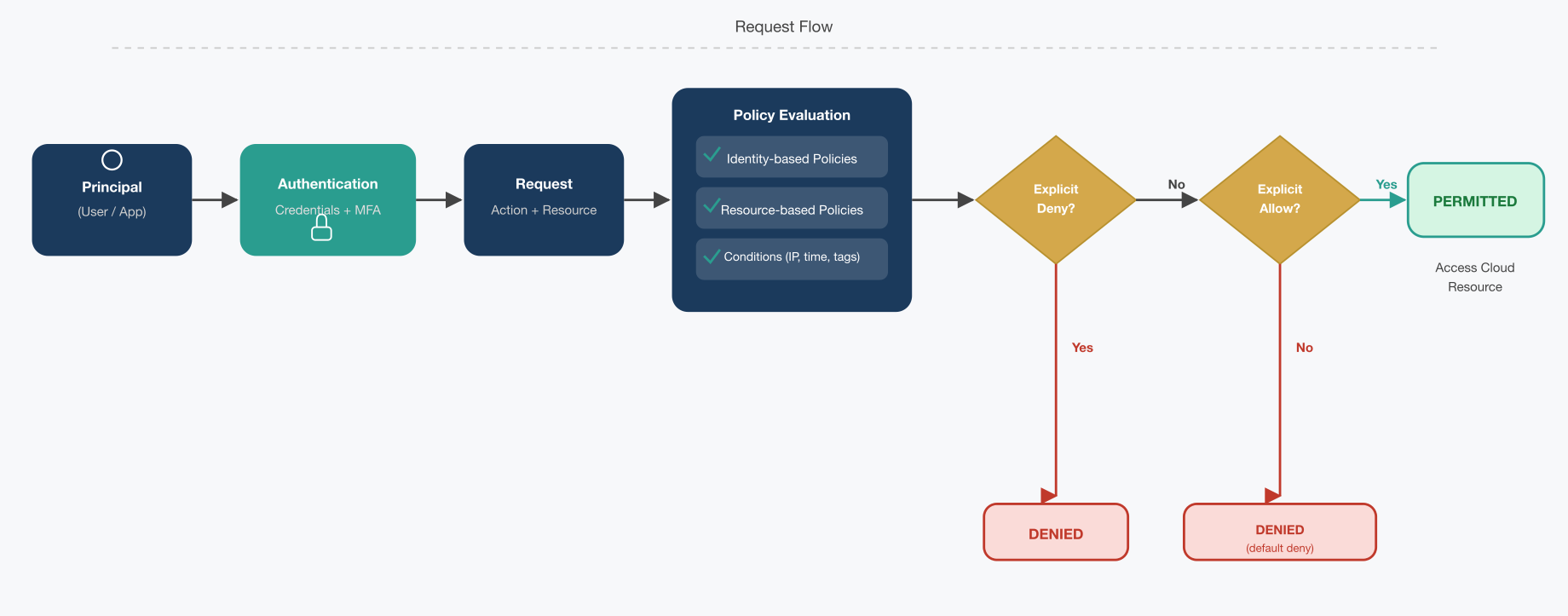
In practice, managing IAM at scale involves not just creating users and roles, but also maintaining them: provisioning and deprovisioning access promptly as staff join or leave projects, performing periodic access reviews, and monitoring for any anomalous access patterns. Cloud providers often integrate IAM logs with monitoring tools; for instance, AWS CloudTrail records IAM authentication attempts and API calls, so one can detect if an account is trying to do something outside its normal profile. Additionally, organizations might use cloud IAM best practices such as avoiding the use of long-lived static credentials (favoring temporary credentials through roles), enabling MFA for any privileged accounts, and using organizational policies/service control policies at the cloud organization level to put guardrails in place (e.g., a policy that no user can delete encryption keys, or no resources can be created in unauthorized regions). These higher-level policies can prevent mistakes or malicious actions that deviate from compliance requirements.
Case Illustration: Consider a fintech startup migrating to the cloud. In early development, all developers had full admin access to the cloud account for agility’s sake. As the company prepared for launch and sought SOC 2 compliance, they realized this practice was risky and non-compliant. A single compromised developer account could have led to a catastrophic breach. The project manager enforced an IAM overhaul: developers received least-privilege roles (e.g., able to deploy code but not read production data), an operations team got roles to manage infrastructure but not view sensitive data, and only the security lead retained full admin rights (protected by MFA). When one developer’s credentials were later leaked in a public Git repository by accident, the attacker who found them was unable to access any customer data or change security settings because of the restricted role. The incident was contained with minimal impact. This scenario shows how strong IAM implementation — rooted in least privilege and good credential hygiene — mitigates insider and external threats, and it also helps meet compliance standards that demand strict access control.
In summary, IAM is fundamental to cloud security. As a project manager, ensure that your cloud project has an IAM architecture where every user and service identity is known, has appropriate permissions, and is monitored. Use cloud-native IAM features (like AWS IAM, Azure AD, GCP IAM) to manage identities at scale, and integrate with corporate directories if applicable so that when employees change roles or leave, their cloud access updates promptly. Remember that access management is an ongoing process, not a one-time task: as the cloud environment scales, regularly review who has access to what. This will not only bolster security but also satisfy compliance auditors who will expect to see principled access control in place.
This page titled 12.2: Identity and Access Management (IAM) in the Cloud was last modified on Tue, 22 Sep 2026 21:13:32 GMT and is shared under a CC BY 4.0 license and was authored, remixed, and/or curated by Felix Amoruwa.
The book could not be loaded just now.