Opening the book…
Implementing a cloud strategy for enterprise workloads often requires choosing the right transition approach for each application. Not all workloads can or should be moved to cloud in the same way. Here we outline several common migration strategies (often called the “R’s” of migration) and technical approaches, specifically focusing on those highlighted by our enterprise workload alignment context: virtualization (rehost), re-platform, resize, and decommission. We will also mention re-architecture where relevant, although that typically goes beyond minimal implementation effort.
- Rehosting (Virtualization / “Lift-and-Shift”): This is the most straightforward approach – take the workload as it is and move it to the cloud infrastructure with minimal changes. In practice, this often means virtualizing physical servers or migrating existing VMs to cloud VM instances. For example, if an on-premises data center has a VMware environment, the VMs can be exported and imported into a public cloud, or one might use tools (like AWS SMS or Azure Migrate) to copy the server images into cloud instances. Virtualization was likely already used on-prem (with dozens of VMs running on hypervisors); moving those to cloud simply shifts where they run. This approach has the benefit of being quick and low-risk: since you’re not altering the software much, compatibility issues are minimized. It’s often chosen when the priority is to migrate fast and when there’s no immediate need or resources to modernize the application. However, a pure lift-and-shift might not fully exploit cloud capabilities – the migrated systems might be over-provisioned or not take advantage of cloud services. It’s common to do a rehost as Phase 1, then optimize further later.
- Re-platforming: Re-platforming means moving a workload to cloud with some moderate changes to better utilize cloud infrastructure (sometimes nicknamed “lift-and-reshape”). You are not rewriting the core application (as would be in a full refactor) but you might switch out some components or configurations. For example, you might take an application running on an outdated OS or database and update those during the move – such as moving from a Windows 2003 server to a modern Windows Server or Linux in the cloud, or swapping an on-prem Oracle database for a cloud-managed database service (like Amazon RDS or Azure SQL). The strategy behind re-platforming is often to eliminate technical debt and take advantage of cloud-managed services where possible, without changing the core architecture of the application. It does involve a bit more effort than rehosting because you have to test that the application still works on the new platform or with the new service. Enterprises often identify a subset of workloads for re-platforming – especially those on legacy platforms nearing end-of-life or those that can gain reliability by using a managed service. For instance, an enterprise might have “20 Re-Platform Candidates” that include servers on unsupported OS versions or physical machines that could be replaced with cloud VMs. Implementing this means planning for things like data migration (e.g., exporting a database and importing to a cloud database service) and configuration changes (maybe updating connection strings, etc.). The benefit is a somewhat optimized environment from day one in the cloud: you offload some responsibilities to the cloud provider (like database patching, if using a DBaaS) and possibly improve performance or security by using newer platforms. The downside is more testing and slight risk if the changes introduce issues. Re-platforming is a sweet spot when an application can’t be fully rebuilt yet but has obvious improvements available through cloud offerings.
- Repurchasing / SaaS Replacement: (While not explicitly listed in our outline, another approach is worth mentioning for context.) This means retiring a custom application and replacing it with a cloud-based SaaS solution. For instance, an on-prem CRM system might be replaced by Salesforce, or a custom monitoring tool replaced by a cloud service. This approach often comes under service adoption strategy rather than pure migration, and it can dramatically change how a workload’s needs are met. We mention it for completeness: if the enterprise cloud strategy allows for adopting new SaaS or PaaS solutions, some workloads won’t be “migrated” at all but rather turned off and replaced. This is effectively a form of decommissioning + replace.
- Refactoring / Rearchitecting: This involves significantly reworking the application (modifying code) to be cloud-native – for example, breaking a monolith into microservices, or rewriting a part of the app to use serverless functions. This goes beyond the scope of “meets implementation” if we interpret that as focusing on aligning existing workloads, but it is a strategy typically reserved for when the value is very high (like unlocking scalability or new features) and the organization is willing to invest in development. It’s mentioned here to contrast with lighter approaches: refactoring is usually the most time-consuming but can yield the biggest long-term benefits. In a phased adoption, one might defer refactoring until after initial migration or target only specific high-value systems for refactor.
- Resizing (Right-Sizing): Resizing isn’t a migration per se, but a post-migration optimization step. It refers to adjusting the resource allocation for a workload to better fit its needs in the cloud. When migrating from on-prem, many servers are over-provisioned (since capacity was fixed and often overestimated to handle peaks). After moving to cloud, enterprises should measure actual usage and right-size instances – possibly choosing smaller instance types for under-utilized workloads, or larger ones for those hitting capacity, or adding more instances to a cluster if needed. Cloud-native monitoring tools make this possible by revealing CPU, memory, and I/O utilization in real time (e.g., Amazon CloudWatch will show if a VM is 90% CPU busy or only 5% busy over time). In our lecture scenario, after a few months in the cloud, a capacity team reviewed CloudWatch and StackDriver metrics and found some instances were overutilized and others underutilized. The logical next step was to resize – shrink some machines, expand others, or move workloads to different instance families better suited for their performance profile. Resizing can also involve shifting storage types (maybe an application doesn’t need expensive SSD storage and could use cheaper disk, or vice versa if it’s I/O constrained). Essentially, resizing is about continuously aligning the allocated cloud resources with the actual workload demand, an ongoing tuning process known as optimization cycles.
- Retiring/Decommissioning: Not every workload should move to the cloud – some should be turned off. Decommissioning is the strategic retirement of applications or infrastructure that are no longer needed or that provide little value compared to the cost or effort to maintain them. In enterprise transitions, it’s common to discover a number of such candidates (for example, an old archive system that no one actively uses, or redundant systems due to past mergers). Those can often be decommissioned instead of migrated, saving effort and cost. In the context of implementation, decommissioning means planning to turn off those systems and possibly migrating any remaining data to an archive or alternate location. The lecture notes example identified “20 Decommission Candidates” in one enterprise, including certain legacy IBM/HP servers and old applications. The on-premises decommission process might have taken 3-6 months for those systems, but in cloud, once their replacements are up, the corresponding cloud resources can be terminated in minutes. The message is that cloud can accelerate decommissioning cycles, but the organization still must handle the data retention, stakeholder approval, and process around turning off systems. Part of the implementation plan should clearly list which workloads will be retired and ensure nothing critical is lost in doing so.
These approaches can be combined within a single enterprise migration. It’s often framed as different tracks for different sets of applications. For example, an enterprise might plan: 60% of apps will be rehosted (quickly lift-and-shift to gain immediate cloud benefits), 20% will be re-platformed during migration (especially those on outdated OS or DB), 10% will be refactored or replaced with SaaS (where beneficial), and 10% will be decommissioned outright. Each approach requires different resources and time. Rehosting may be fastest (weeks per app), refactoring the slowest (months to years for a large system). The choice depends on the business drivers for each workload – for instance, if the business goal is to exit the data center quickly to save costs, more workloads might be rehosted; if the goal is to modernize for agility, more might be refactored or re-platformed during the move.
Below is a summary table of these migration approaches, tailored to our context:
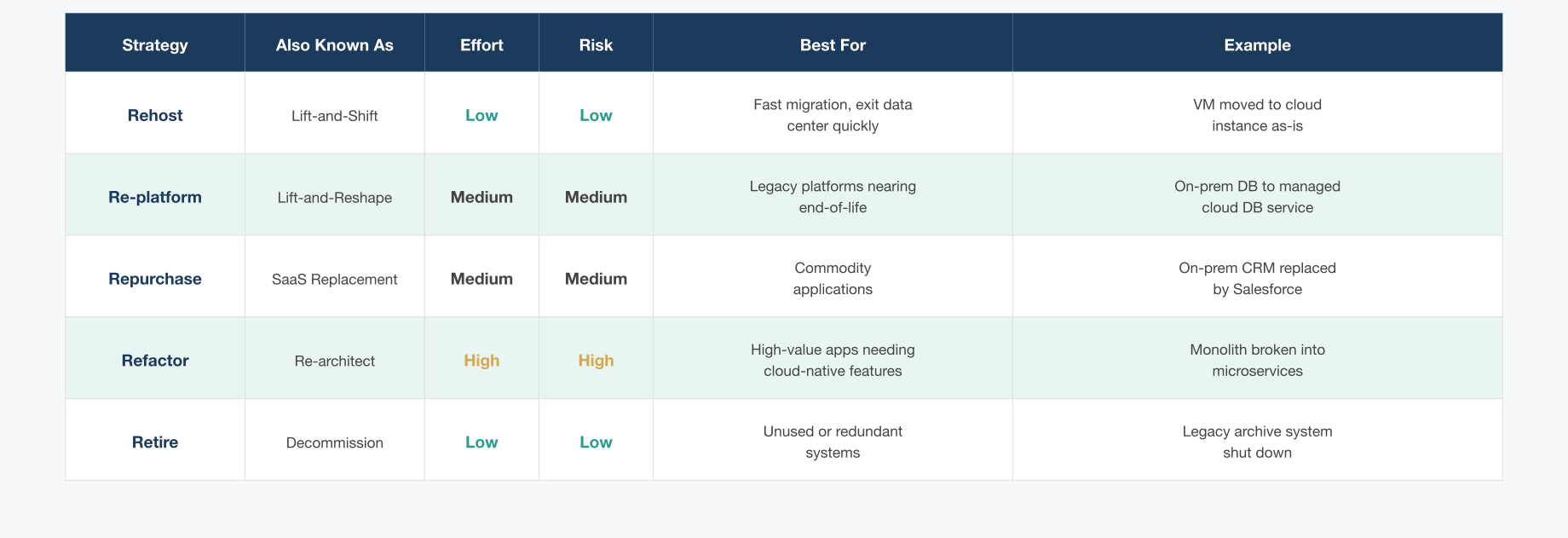
The actual implementation plan for an enterprise will assign one (or a combination) of these approaches to each application in the portfolio. Decision tools and analyses (sometimes called application disposition or cloud suitability analysis) help categorize each workload. For example, a legacy archive system might be slated for retire, a customer-facing web app for rehost then refactor later, an internal HR system might be re-platformed into a SaaS, etc. The key is that by the time you begin implementation, each workload has a clear target state and method of migration.
This page titled 9.5: Transition Approaches- From Servers to Services was last modified on Tue, 22 Sep 2026 21:13:29 GMT and is shared under a CC BY 4.0 license and was authored, remixed, and/or curated by Felix Amoruwa.
The book could not be loaded just now.